Most scheduling problems don’t start with the schedule. They start before it, when there’s no clear system for who’s available, what’s needed, and how it all fits together. The result is a reactive cycle: last-minute scrambles, overstaffed slow shifts, understaffed busy ones, and labor costs nobody budgeted for.
Good workforce scheduling breaks that cycle entirely. Here’s what we’re covering:
- What workforce scheduling actually means
- How it differs from workforce management
- Key components of an effective scheduling process
- Common challenges and how to solve them
- The role of technology and AI in modern scheduling
- How to measure whether your scheduling is actually working
Teams that get scheduling right don’t just save time. They cut labor costs, reduce no-shows, and give their people a better experience at work. Platforms such as Nowsta make that kind of consistency achievable without the manual grind.
What Workforce Scheduling Actually Means
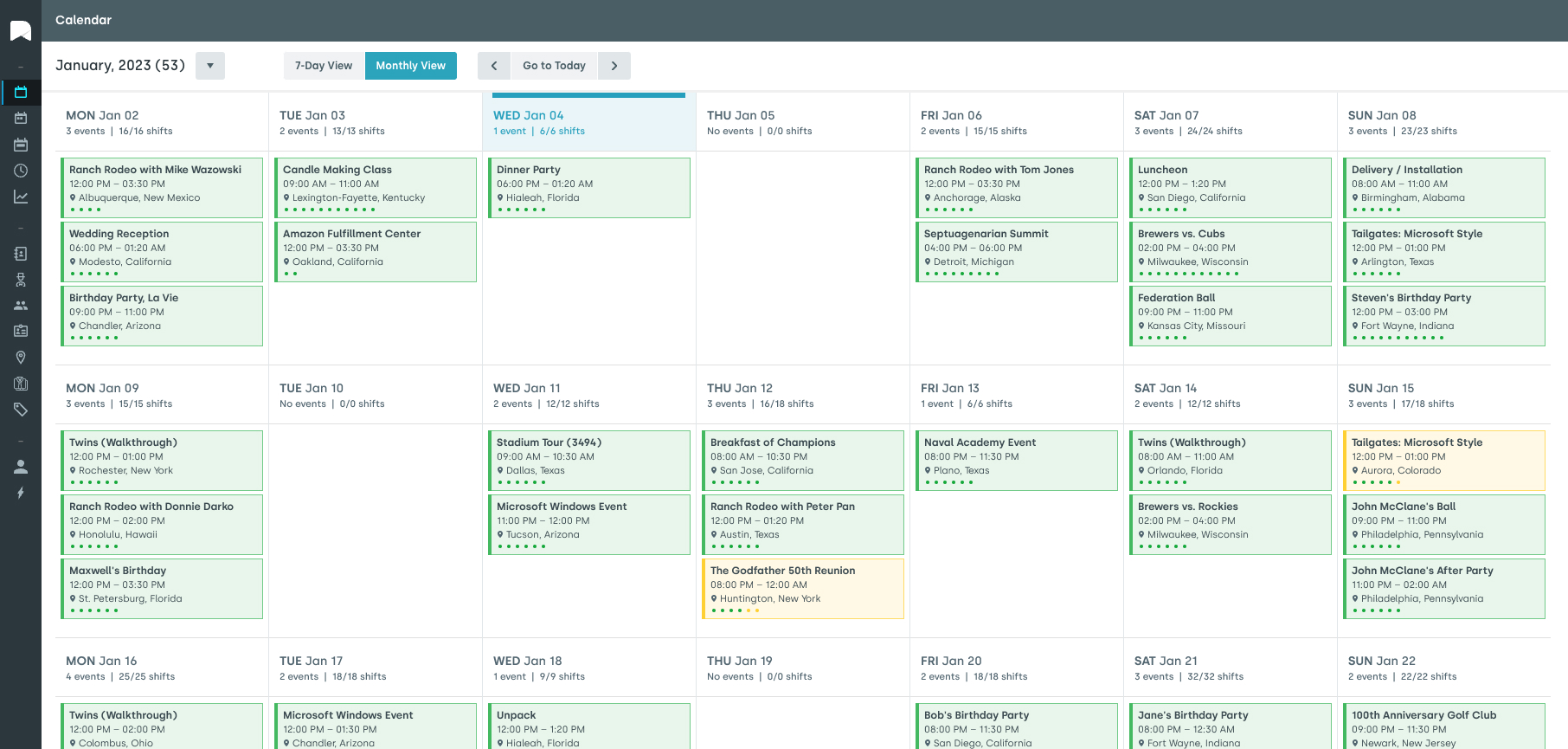
At its core, workforce scheduling is the process of putting the right people in the right place at the right time. That sounds simple. In practice, it means balancing employee availability, labor budgets, business needs, shift coverage, and compliance with labor laws, all at once, often across multiple locations.
It’s not just about filling open shifts. It’s about building work schedules that keep operations running smoothly without burning through your labor budget or burning out your team.
Most businesses that struggle with scheduling aren’t short on effort. They’re short on system. When managers manually create schedules without real-time data or historical demand patterns to guide them, every week becomes a guessing game. Someone gets overscheduled. A shift goes uncovered. Overtime spikes. And payroll looks nothing like what was planned.
Good workforce scheduling removes the guesswork. It creates a repeatable, data-driven process that keeps labor needs matched to actual demand, whether you’re planning shifts for 30 workers or 3,000.
Pro tip:The quality of your schedule directly determines the quality of your employee experience. Inconsistent, last-minute, or unfair shift schedules are one of the top reasons hourly workers quit.
How It Differs from Workforce Management
People use these terms interchangeably, but they’re not the same thing. Understanding the difference helps you figure out where the gaps in your operations actually are.
| Workforce Scheduling | Workforce Management | |
|---|---|---|
| Focus | Planning future staffing needs | Executing and overseeing daily operations |
| Time horizon | Days, weeks, months ahead | Real time and day-to-day |
| Key activities | Build shift schedules, manage time off requests, plan labor budget | Track attendance, monitor productivity, process payroll |
| Primary tools | Employee scheduling software, demand forecasting | Time and attendance systems, workforce management tools |
| Goal | Get the right people scheduled | Make sure the plan actually runs |
Think of scheduling as the game plan, and workforce management as the coaching decisions made during the game. You need both working together for consistent business outcomes.
Workforce scheduling feeds directly into workforce management. A poorly built schedule creates real–time chaos, no-shows, coverage gaps, and unplanned overtime. A well-built one gives managers the breathing room to actually manage instead of constantly putting out fires.
Nowsta brings both sides of this equation into one platform, so the plan you build and the shift that actually runs stay in sync.
Key Components of an Effective Scheduling Process
Effective workforce scheduling isn’t a single action. It’s a process made up of several moving parts, each one influencing the next.
1. Demand Forecasting
Before you can plan schedules, you need to know what you’re planning for. That means using historical data, seasonal trends, and business projections to estimate how many workers you’ll need and when. Forecasting well is what separates proactive scheduling from constant reactive scrambling.
2. Employee Availability Management
Allowing employees to submit their availability and time off requests in advance is non-negotiable. Without it, managers are building schedules blind. A solid scheduling process captures employee availability in real time and factors it into every shift build.
3. Shift Building and Assignment
This is where you actually create schedules. Best-in-class scheduling accounts for:
- Employee skills and certifications
- Compliance with labor laws (rest periods, maximum hours, minor work restrictions)
- Balanced distribution of shifts across the whole team
- Coverage of open shifts during peak periods
- Avoiding unnecessary overtime before it happens
4. Communication and Schedule Distribution
A schedule nobody can access is worthless. Workers need to view schedule changes, claim shifts, and swap shifts quickly, ideally from a mobile device. Team communication tools built into your scheduling platform eliminate the endless text chains and group chats that slow everything down.
5. Time and Attendance Tracking
Once schedules are live, you need to track attendance in real time. Who clocked in, who didn’t, and whether hours are aligning with what was planned. This data is critical for processing payroll accurately and identifying patterns like chronic absenteeism before they become expensive habits.
6. Payroll Integration
The scheduling process doesn’t end when a shift does. Hours worked need to flow cleanly into payroll. When scheduling software and payroll systems are disconnected, errors multiply, and administrative work explodes. Integration between the two is what makes the whole cycle efficient.
Common Challenges and How to Solve Them
Even experienced operations teams run into the same scheduling headaches over and over. Here’s what they look like and what actually fixes them.
Last-Minute No-Shows
- The problem: An employee doesn’t show up. A manager spends 45 minutes calling around to find coverage. The shift starts late, understaffed, or not at all.
- The fix: Automated shift reminders reduce no-shows significantly. When workers can claim shifts and swap shifts directly through a mobile app, coverage gaps fill faster and with far less manager involvement. Nowsta customers see a 28% reduction in no-shows after implementing automated scheduling and notification workflows.
Uncontrolled Overtime
- The problem: Managers don’t realize someone is approaching 40 hours until it’s too late. Overtime gets approved reactively, and the labor budget takes a hit nobody planned for.
- The fix: Real-time data and automated alerts that flag when employees are approaching overtime thresholds. When managers can see projected labor costs before publishing schedules, they can make smarter decisions upfront instead of paying for mistakes later.
Scheduling Across Multiple Locations
- The problem: Managing shift schedules for multiple locations in separate systems means disconnected data, duplicated work, and zero visibility into your workforce as a whole.
- The fix: A centralized platform with full access across all sites. Managers at every location should be working from the same system so you can see staffing levels, labor costs, and shift coverage in one view.
Compliance Exposure
- The problem: Labor laws around rest periods, employee breaks, minor work restrictions, and overtime vary by state and industry. Manual scheduling makes it easy to miss one.
- The fix: Scheduling software with built-in compliance guardrails that flag violations before they happen, not after a Department of Labor audit.
Poor Team Communication
- The problem: Schedule changes communicated through scattered text threads, email chains, or personal phone calls create confusion, missed messages, and frustrated employees.
- The fix: Integrated team messaging within your scheduling platform. When workers receive schedule changes, shift reminders, and team updates through one tool, you improve team communication and reduce the administrative burden on managers.
The Role of Technology and AI in Modern Scheduling
Manual scheduling had its moment. Spreadsheets, whiteboards, and phone trees worked when teams were small and demand was predictable. Neither of those conditions describes most businesses today.
According to McKinsey, 78% of organizations now use AI for at least one business function, up from 55% in 2023. Scheduling is one of the highest-impact areas where that shift is paying off.
What Modern Scheduling Software Actually Does
Today’s employee scheduling software goes well beyond building a weekly calendar. The best workforce scheduling software platforms:
- Use machine learning to analyze historical data and forecast future staffing needs with far greater accuracy than human intuition alone
- Auto-fill open shifts based on employee availability, skills, and labor budget constraints
- Flag compliance risks before a schedule is published
- Give workers full access to their schedules, shift swapping, and time off requests through mobile apps
- Connect directly to time and attendance and payroll systems, so data flows without manual entry
- Surface real-time data and labor cost analytics that help managers make decisions in the moment, not after the fact
AI-Powered Scheduling: Beyond Automation
There’s a meaningful difference between automated scheduling and AI-powered scheduling. Automated scheduling follows rules you set. AI-powered scheduling learns from patterns in your data, demand trends, employee behavior, and business outcomes, and continuously refines its recommendations.
Organizations that implement AI-based workforce management tools report up to a 12% reduction in labor costs due to better shift alignment and reduced overtime.
Nowsta’s AI-powered scheduling engine does exactly this. It helps managers build optimal schedules in minutes, not hours, cutting scheduling time by up to 80% while factoring in demand forecasting, employee availability, and compliance requirements automatically. For operations teams managing hourly and contingent workers across multiple locations, that’s not a minor convenience. It’s a fundamental shift in how efficiently the whole business runs.
Pro tip:The real value of AI in scheduling isn’t just speed. It’s consistency. AI doesn’t forget labor law rules, overlook an employee’s rest period, or miss that someone’s already hit 38 hours. It catches what humans miss, every time.
How to Measure Whether Your Scheduling Is Working

You can’t improve what you don’t measure. These are the metrics that actually tell you whether your scheduling process is delivering results or just keeping the lights on.
| Metric | What It Tells You | Target Benchmark |
|---|---|---|
| Schedule adherence rate | % of shifts worked as scheduled | 90%+ |
| Overtime as % of total labor | Whether OT is planned or reactive | Under 10% of total hours |
| No-show rate | Reliability of your workforce | Under 5% per period |
| Time to fill open shifts | Speed of your coverage process | Under 2 hours |
| Labor cost vs. labor budget | Scheduling accuracy vs. financial plan | Within 3-5% variance |
| Scheduling time per week | Administrative burden on managers | Under 2 hours for most teams |
| Employee satisfaction with schedules | Fairness, consistency, and advance notice | Track via pulse surveys |
What to Do With This Data
Raw numbers aren’t enough. The goal is to look at these metrics together and identify where the scheduling process is breaking down. A high no-show rate combined with low schedule adherence often points to a communication problem. High overtime paired with low coverage gaps usually means forecasting is off.
Most businesses that switch to dedicated workforce scheduling software see measurable improvements within the first few weeks because the data analysis is built in. You’re not manually hunting through spreadsheets. The platform surfaces what’s working and what isn’t, so managers can focus on fixing problems instead of finding them.
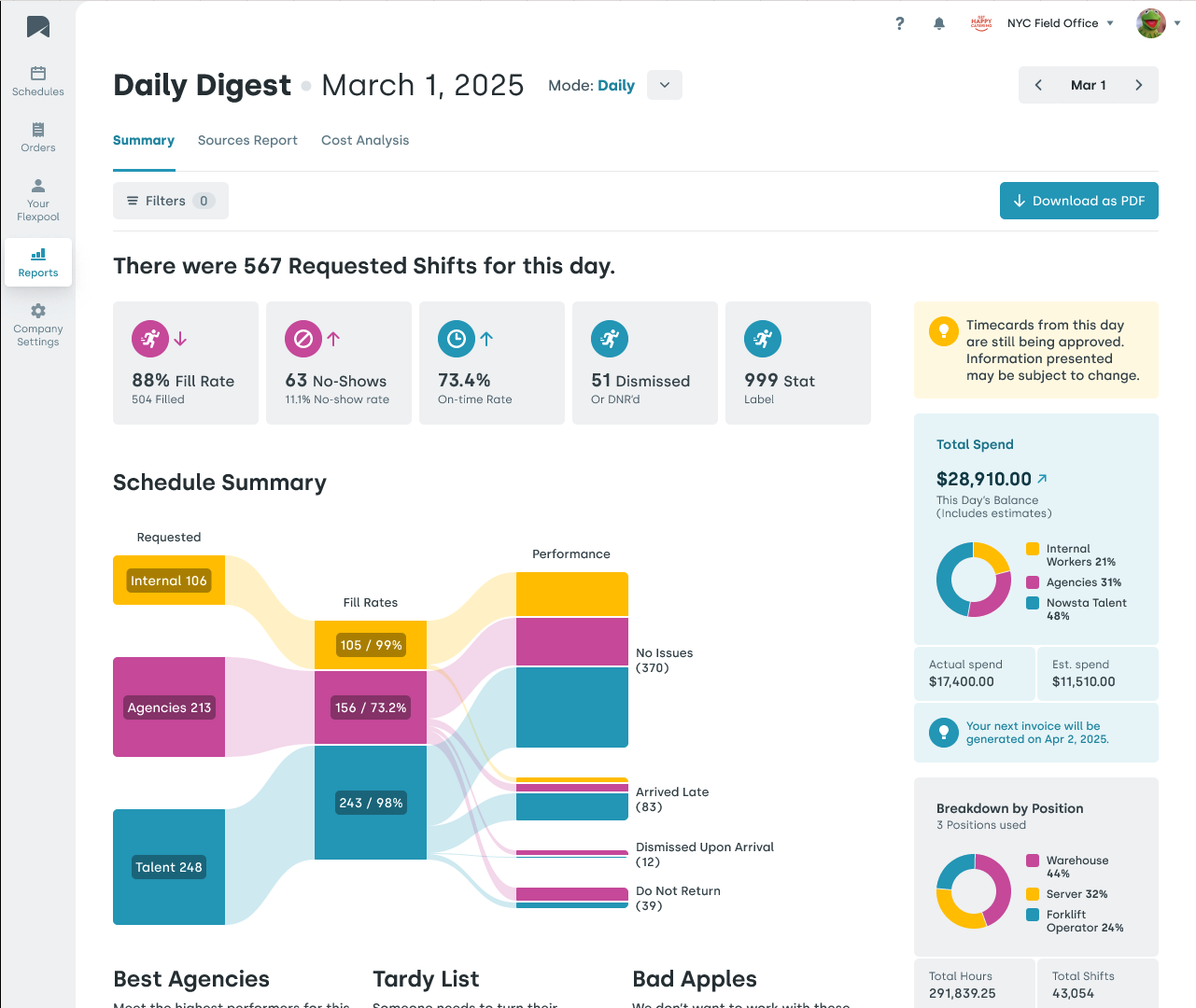
Nowsta gives operations teams centralized reporting and real-time dashboards across every location, so the numbers that matter are always visible, always current, and always actionable. That kind of visibility is what turns scheduling from a weekly chore into a genuine competitive advantage.
Build Smarter Shift Schedules Faster with Nowsta
Workforce scheduling touches every part of your operation, from how much you spend on labor to how your employees feel coming into work each day. When the process is broken, everything downstream breaks with it: costs spike, coverage suffers, and managers spend their best hours doing administrative work instead of leading their teams.
Key takeaways:
- Workforce scheduling is the process of matching the right people to the right shifts at the right time, using data, not instinct
- It’s distinct from workforce management: scheduling is the plan, management is the execution
- Effective scheduling requires demand forecasting, availability tracking, compliance guardrails, and payroll integration working together
- AI and machine learning help optimize schedules faster, reduce absenteeism, and improve scheduling efficiency at scale
- The metrics that matter most: schedule adherence, no-show rate, overtime percentage, and labor cost variance
- Technology is no longer optional. It’s the difference between a scheduling process that works and one that constantly fails you
Scheduling at scale is hard. Nowsta makes it significantly less so. With AI-powered shift building, real-time time tracking, mobile-first tools for your whole team, and seamless payroll integration, it’s the platform that turns workforce scheduling from a weekly headache into a genuine operational strength.
Still building schedules by hand every week? Nowsta cuts scheduling time by up to 80% with AI-powered automation. Schedule a demo.
FAQs
What is a workforce scheduler?
A workforce scheduler is the person or system responsible for building and managing employee shift schedules. Their job is to align staffing levels with business demand while keeping labor costs in check, maintaining compliance, and ensuring shifts are covered. In modern operations, software solutions handle much of this automatically, freeing managers from time-consuming administrative work.
What is the difference between Workday and workforce?
Workday is a specific HCM and ERP software platform used for HR, finance, and operations. “Workforce” is a broader term referring to your employees as a whole. Most scheduling efficiency tools, including purpose-built workforce scheduling platforms, focus specifically on time tracking, shift management, and labor optimization; areas where general HCM platforms like Workday are often less specialized.
What is the difference between HR and workforce management?
HR covers the full employee lifecycle: hiring, onboarding, benefits, performance, and culture. Workforce management is narrower and more operational. It focuses on scheduling, time tracking, attendance, labor cost control, and compliance on a day-to-day basis. Most businesses need both, but they serve different functions and typically run on different software solutions.
What are the roles and responsibilities of WFM?
Workforce management responsibilities typically include building and publishing shift schedules, forecasting future labor needs, tracking attendance, managing time off and request time submissions, monitoring labor costs against budget, and ensuring compliance with labor laws. Task management and team communication often fall under WFM as well, especially in shift-based environments.
What is an example of workforce management?
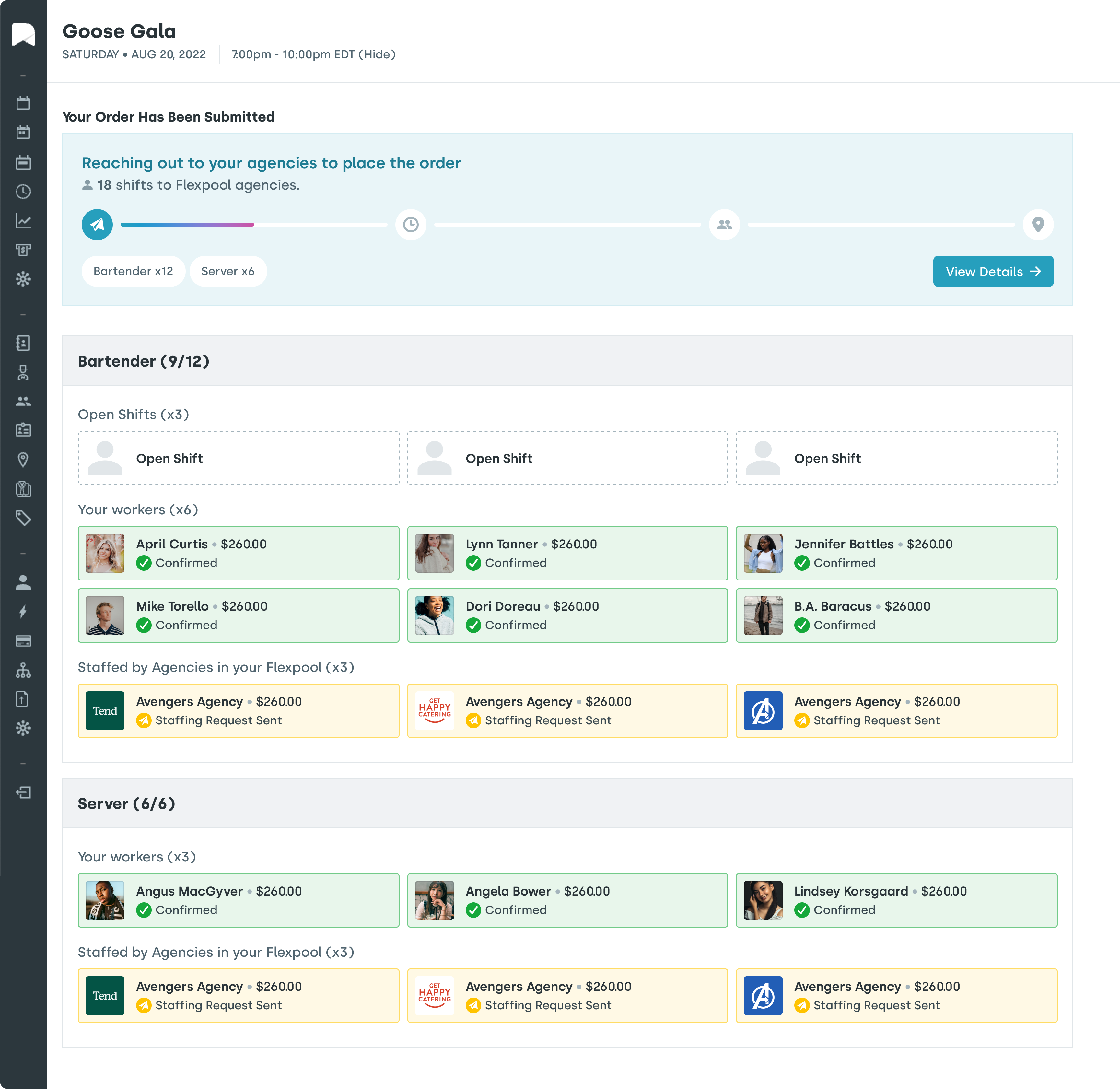
A catering company managing 200 hourly workers across weekend events is a strong example. They need to forecast how many servers and bartenders each event requires, schedule accordingly, track who clocks in, manage last-minute call-outs, and process payroll accurately at week’s end.
What is a 2/2/3-3 work schedule?
The 2/2/3 schedule (also called a Pitman schedule) is a rotating shift pattern where employees work 2 days on, 2 days off, then 3 days on, alternating between day and night shifts across a two-week cycle.
It’s common in 24/7 operations like healthcare, manufacturing, and security. It helps optimize schedules for round-the-clock coverage while giving workers predictable rotation patterns and enough rest periods to reduce absenteeism over time.