How Large Organizations Transition Off Spreadsheets Without Disruption
Everyone knows spreadsheets aren’t the answer anymore. Yet around 60% of organizations still rely on them as their primary scheduling tool. The reason isn’t loyalty. It’s fear. Fear of downtime, data loss, and the chaos that comes with ripping out a system your entire team depends on.
But here’s the thing. The disruption you’re avoiding by not switching is already happening, slowly, in the form of errors, compliance gaps, and hours of wasted productivity every week.
This guide breaks down how to make the move without breaking your operation:
How to audit your current spreadsheet dependency and identify risk areas
A phased migration framework that keeps daily operations running
What to look for in a workforce management platform
How to get buy-in from managers and frontline staff
Common migration mistakes and how to avoid them
Nowsta is an all-in-one workforce orchestration platform designed for shift-based teams. It replaces spreadsheets with AI-powered scheduling, time tracking, payroll integration, and built-in compliance. Over 25,000 teams have already made the switch.
Audit Your Spreadsheet Dependency First
You can’t fix what you haven’t mapped. Before you even consider replacing spreadsheets, you need a clear picture of how deeply they’re embedded in your day-to-day operations. Most organizations are surprised by what they find.
Identify Every Spreadsheet in Play
Start by cataloging every Excel file your teams use for workforce-related tasks. Scheduling, time tracking, payroll calculations, compliance logs, and reporting. Chances are, multiple people across different departments are managing spreadsheets that contain overlapping or conflicting versions of the same data.
Ask these questions during your audit:
Who owns each file? If only one person understands how a spreadsheet works, that’s a single point of failure for your entire operation
How many versions exist? Version control issues multiply fast when managers across locations edit the same file independently
What critical functions depend on it? Map which business operations would stall if a specific spreadsheet broke or disappeared tomorrow
Where is sensitive data stored? Employee wages, Social Security numbers, and compliance records sitting in unprotected Excel files create a serious security risk
How often do errors occur? Track how much time teams spend hours each week correcting formulas, re-entering data, or reconciling conflicting numbers
Score Your Risk Areas
Not every spreadsheet needs to go on day one. Prioritize by risk. A scheduling spreadsheet used by one manager at a single location is low risk. A payroll tracking file that feeds finance reporting across your entire organization is high risk.
Risk Level
Characteristics
Priority
Critical
Touches payroll, compliance, or sensitive data. Multiple editors. No audit trails
Migrate first
High
Scheduling across locations. Version control problems. Manual effort over 5 hrs/week
Migrate in Phase 1
Medium
Department-level reporting. Limited editors. Some data integrity concerns
Migrate in Phase 2
Low
Simple task tracking. Single user. No compliance implications
Migrate last or keep
Don’t skip this step. Research from the University of Tennessee found that organizations conducting thorough data assessments before migrating reduce their failure rate by up to 40%. An audit isn’t just a checklist. It’s the foundation your entire transition builds on.
A Phased Migration Framework
The biggest mistake companies make when moving beyond spreadsheets is trying to do everything at once. A “big bang” approach sounds efficient, but it’s the fastest path to disruption. The smarter move is a phased approach that lets you transition in stages while keeping business operations running smoothly.
Phase 1: Pilot With One Team or Location
Pick a single department, location, or use case to start. Ideally, choose a team that’s already feeling the pain of managing spreadsheets, high error rates, frequent scheduling conflicts, or compliance close calls. They’ll be your most motivated users.
During the pilot:
Migrate scheduling and attendance tracking to the new platform first
Run the new system alongside old systems for two to four weeks
Collect feedback from managers and frontline staff on workflows, speed, and usability
Document any gaps between what the spreadsheet handled and what the platform covers
This parallel run protects you. If something goes wrong, your old process is still intact. Meanwhile, you’re gathering real data on how the new system performs under actual conditions.
Phase 2: Expand to Core Operations
Once the pilot proves out, begin expanding to additional teams and departments. This is where you bring in payroll integration, compliance automation, and broader time tracking systems.
Key tasks in this phase:
Connect your existing payroll system so data flows directly without manual effort or re-entry
Activate compliance features that monitor labor laws and flag overtime risks in real time
Train managers on advanced tools like automated scheduling, reporting, and employee availability management
Retire the old spreadsheets for migrated functions. Don’t leave them running in parallel indefinitely, or teams will default back to the familiar
Phase 3: Full Rollout and Optimization
With core operations on the platform, expand to the remaining departments and locations. At this stage, you’re also unlocking more data and deeper analysis, things like labor cost forecasting, interactive dashboards, and talent intelligence that traditional spreadsheets could never deliver.
Phase
Focus
Duration
Key Milestone
Pilot
One team or location. Scheduling + attendance
2-4 weeks
Validated workflows, user feedback collected
Core Expansion
Payroll, compliance, time tracking across teams
4-8 weeks
Old systems retired for migrated functions
Full Rollout
All departments, advanced reporting, optimization
4-6 weeks
Complete transition. Spreadsheets fully replaced
Nowsta’s implementation team supports this kind of phased approach directly. From onboarding to full deployment, you get a dedicated success manager who helps configure the platform for your specific scheduling needs, industry requirements, and team structure. That’s not a generic setup wizard. It’s a hands-on partnership.
What to Look for in a Platform
Not every workforce management solution is built the same. Some are glorified calendars. Others are bloated enterprise systems that take six months to implement. The right platform sits in the middle: powerful enough to handle the growing complexity of your operations, but intuitive enough that your team actually uses it.
Non-Negotiable Features
When evaluating alternatives to spreadsheets, focus on the features that directly eliminate the manual processes eating your team’s time:
Automated scheduling that uses artificial intelligence to match employees to shifts based on skills, certifications, availability, and labor law requirements
Time and attendance tracking with GPS verification, geofencing, and mobile clock-in so you can track time accurately without chasing paper timesheets
Payroll integration that syncs directly with your existing payroll and accounting tools, eliminating double entry and reducing errors
Compliance monitoring that flags overtime violations, break requirements, and regulatory changes in real time, not after the fact
Audit trails for every schedule change, time edit, and approval, giving you complete data integrity for reporting and compliance reviews
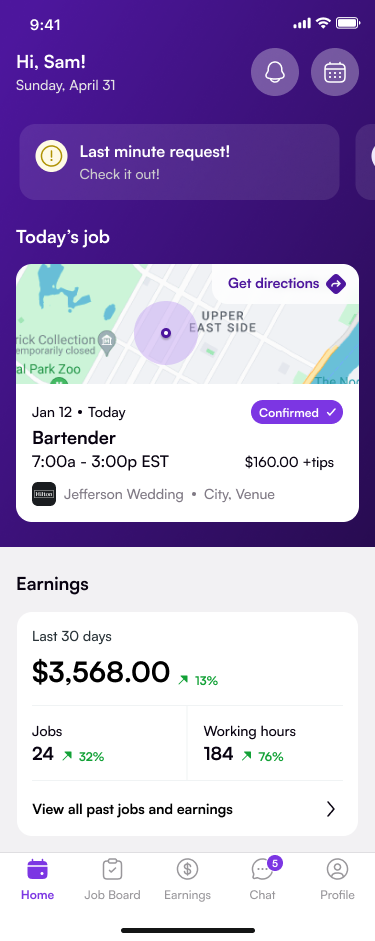
Mobile self-service allowing employees to view schedules, claim open shifts, update availability, and communicate with managers from their phones
Reporting and data analysis with real-time updates and interactive dashboards that replace the static, outdated reporting you’re used to from Excel
Questions to Ask Every Vendor
Before signing anything, make sure you can answer “yes” to each of these:
Does the platform integrate with our existing payroll and finance systems?
Can it scale as our organization keeps expanding?
Does it handle compliance for our specific industry and the complex labor laws we navigate?
How long does implementation take, and what support is included?
Is the system mobile-first, or is mobile an afterthought?
What does the customer experience look like post-launch?
Feature
Why It Matters
Nowsta
AI-powered scheduling
Eliminates hours of manual work
Builds optimized schedules in minutes
GPS time tracking
Prevents buddy punching and time theft
Mobile clock-in with geofencing
Payroll sync
Stops data re-entry errors
Direct integration with existing systems
Compliance automation
Protects against costly violations
Real-time monitoring and alerts
Audit trails
Proves compliance during audits
Timestamped record of every action
Mobile app
Empowers frontline workers
Full self-service for shifts and availability
Talent intelligence
Fills every position with the right person
Ranks workers by skill and performance
How to Get Buy-In From Your Team
You can pick the best platform on the market, but if your managers and frontline staff don’t adopt it, the investment fails. Research shows that employees are four times more likely to trust change messages from their direct manager than from corporate communications. That means your rollout strategy starts with people, not software.
Getting Leadership on Board
Decision-making at this level typically involves stakeholders from operations, finance, and HR. Each one cares about different outcomes. Speak their language:
Operations wants to know how much time they’ll save on scheduling and how quickly they’ll see an improvement in no-show rates
Finance wants to see a projected reduction in labor costs, unnecessary overtime, and payroll errors
HR wants to understand how the platform improves the overall experience for workers, from onboarding through daily shift management
Frame the conversation around ROI, not features. Show leadership the cost of not switching: the hours lost to repetitive tasks, the compliance risk teams carry, and the turnover tied to paycheck errors. The numbers usually close the argument.
Getting Managers to Champion It
Your managers are the bridge between the platform and the people who use it daily. If they resist, everyone below them will too. Here’s how to bring them in:
Involve them early. Let managers test the system during the pilot phase. Their feedback shapes the rollout and gives them ownership of the process
Focus on what they gain. Less time on admin. Fewer phone calls. Better visibility into staffing. More time to actually manage
Provide hands-on training. Not a one-hour webinar. Real, role-specific training that shows them how the platform fits their daily workflows
Celebrate quick wins. When a manager builds their first automated schedule in five minutes instead of five hours, make sure the rest of the organization hears about it
Getting Frontline Staff to Adopt
Hourly workers and shift employees don’t care about dashboards or data analysis. They care about knowing when they work, getting paid correctly, and being able to communicate with their manager without jumping through hoops.
Show them:
How to check their schedule on the mobile app in seconds
How to swap shifts or update availability without texting their manager
How real-time notifications keep them informed about changes instantly
How accurate time tracking means accurate paychecks, every single time
Pro tip:Nowsta’s mobile-first design was built specifically for frontline workers. The app is intuitive enough that most users adopt it without formal training, which dramatically reduces friction during rollout.
Common Migration Mistakes to Avoid
Even with a solid plan, the transition from spreadsheets to a dedicated platform can go sideways if you’re not watching for predictable pitfalls. Here are the ones that trip up most organizations.
Mistake 1: Trying to Migrate Everything at Once
We covered this in the phased framework section, but it’s worth repeating. Going from Excel to a full platform overnight sounds bold. It’s also the fastest way to overwhelm your team, create data gaps, and trigger the exact disruption you were trying to avoid. Start small. Scale up.
Mistake 2: Not Cleaning Your Data First
Spreadsheets accumulate years of messy, duplicated, and outdated information. If you migrate all of that into a new system without cleaning it first, you’re just moving the chaos to a fancier location. Before any data transfer:
Verify that compliance records are current and complete
Archive anything no longer relevant to active operations
Mistake 3: Skipping the Parallel Run
Running your old and new systems side by side for a few weeks feels like extra work. It is. But it’s also your safety net. A parallel run lets you identify gaps in the new platform, verify data integrity between systems, and build confidence across your team before you fully cut over.
Mistake 4: Underinvesting in Training
Even the most user-friendly system will fail to deliver value if employees don’t integrate it into their daily routines. A single training session on launch day won’t cut it. Build a training plan that includes:
Role-specific sessions for admins, managers, and frontline users
Hands-on practice time before go-live
Ongoing support channels where users can ask questions and get help without waiting days for a response
Mistake 5: Leaving Old Systems Running Too Long
If spreadsheets remain accessible after migration, people will use them. It’s human nature. Teams default to what’s familiar, especially under pressure. Set a clear cutoff date for each phase of your migration and communicate it well in advance. Once a process has moved to the new platform, retire the old file. No exceptions.
Mistake
What Happens
How to Avoid It
Big bang migration
Team overwhelm, data gaps, operational disruption
Use a phased approach with pilot testing
Dirty data migration
Errors and duplicates carry over to new system
Clean, standardize, and verify before transfer
No parallel run
No safety net if something breaks
Run both systems for 2-4 weeks per phase
Insufficient training
Low adoption, staff revert to old tools
Role-specific, hands-on, ongoing training
Old systems still active
Teams default back to spreadsheets
Set firm cutoff dates and communicate early
Nowsta’s onboarding process is designed to help you avoid every one of these mistakes. You get a dedicated customer success manager, structured implementation timelines, and training resources built for every user level. The focus isn’t just on getting you live. It’s on making sure the platform becomes the way your team works, not just another tool collecting dust.
Move Beyond Spreadsheets Smoothly With Nowsta
Transitioning off spreadsheets doesn’t require a leap of faith. It requires a plan. Audit your dependency, migrate in phases, invest in training, and choose a platform that actually fits how your team operates. The companies that get this right don’t just survive the switch. They wonder why they waited so long.
Key takeaways
Audit every spreadsheet to identify risk areas and critical dependencies before migrating
Use a phased approach: pilot first, expand to core operations, then do a full rollout
Run old and new systems in parallel for two to four weeks per phase
Prioritize platforms with automated scheduling, compliance monitoring, and payroll integration
Get leadership, managers, and frontline staff bought in before launch day
Clean your data, set firm cutoff dates, and never leave old systems running indefinitely
Nowsta was built for exactly this kind of transition. With dedicated onboarding support, a mobile-first design that frontline workers actually adopt, and a platform that handles scheduling, payroll, time tracking, and compliance in one place, it takes the guesswork out of going live.
Ready to move off spreadsheets without the chaos? Nowsta’s onboarding team guides you through every phase. No disruption. No data loss. Schedule a demo and see what a clean break from spreadsheets actually looks like.
FAQs
Do companies still use spreadsheets?
Yes. Despite the growth of web apps and dedicated platforms, a large number of companies still rely on spreadsheets for scheduling, time tracking, and data storage. The challenges emerge as teams grow. What works for 20 employees creates serious limitations at 100+, including version control problems, compliance gaps, and mounting human error.
What is one reason organizations prefer databases over spreadsheets?
Data integrity. Databases enforce structure, validation rules, and access controls that spreadsheets simply can’t. When multiple people edit the same file in Excel, there’s no reliable way to prevent conflicting entries or track who changed what. Databases and modern web apps solve this with centralized data storage, role-based permissions, and complete audit trails, all of which drive operational efficiency and reduce risk.
What is one limitation of spreadsheets in terms of data organization?
Spreadsheets store everything in flat, disconnected files. There’s no way to create meaningful relationships between datasets without manual effort and complex formulas. As data grows, this creates performance issues, duplication, and formatting inconsistencies that make reliable reporting nearly impossible. It’s one of the core limitations that pushes organizations toward innovation in workforce management, where connected platforms handle data organization automatically.
Why does managing multiple spreadsheets to store inventory data become difficult?
Because every additional file introduces new challenges. Version control breaks down. Data storage becomes fragmented across departments. The same information lives in multiple places with no single source of truth. Teams spend hours reconciling conflicting numbers, and the risk of human error compounds with every manual update. Modern web apps and workforce platforms consolidate everything into one system, eliminating the limitations of juggling disconnected files while unlocking real operational efficiency.
Stay in the know
Subscribe to our blog and get news, insights and trends from staffing and operations experts.
We use tools on this site to collect and record your data (e.g., your searches), which we and our vendors may use to provide, improve, and personalize our offerings, make recommendations, and for analytics and marketing. By continuing, you agree to these terms.
Cookie Preferences
Manage your cookie preferences below:
Essential cookies enable basic functions and are necessary for the proper function of the website.
Name
Description
Duration
Cookie Preferences
This cookie is used to store the user's cookie consent preferences.
30 days
These cookies are needed for adding comments on this website.
Name
Description
Duration
comment_author
Used to track the user across multiple sessions.
Session
comment_author_email
Used to track the user across multiple sessions.
Session
comment_author_url
Used to track the user across multiple sessions.
Session
Google Tag Manager simplifies the management of marketing tags on your website without code changes.
Name
Description
Duration
cookiePreferences
Registers cookie preferences of a user
2 years
td
Registers statistical data on users' behaviour on the website. Used for internal analytics by Nowsta.
session
Statistics cookies collect information anonymously. This information helps us understand how visitors use our website.
Google Analytics is a powerful tool that tracks and analyzes website traffic for informed marketing decisions.
Used to monitor number of Google Analytics server requests when using Google Tag Manager
1 minute
__utmz
Contains information about the traffic source or campaign that directed user to the website. The cookie is set when the GA.js javascript is loaded and updated when data is sent to the Google Anaytics server
6 months after last activity
__utmv
Contains custom information set by the web developer via the _setCustomVar method in Google Analytics. This cookie is updated every time new data is sent to the Google Analytics server.
2 years after last activity
__utmx
Used to determine whether a user is included in an A / B or Multivariate test.
18 months
_ga
ID used to identify users
2 years
_gali
Used by Google Analytics to determine which links on a page are being clicked
30 seconds
_ga_
ID used to identify users
2 years
_gid
ID used to identify users for 24 hours after last activity
24 hours
_gac_
Contains information related to marketing campaigns of the user. These are shared with Google AdWords / Google Ads when the Google Ads and Google Analytics accounts are linked together.
90 days
__utma
ID used to identify users and sessions
2 years after last activity
__utmt
Used to monitor number of Google Analytics server requests
10 minutes
__utmb
Used to distinguish new sessions and visits. This cookie is set when the GA.js javascript library is loaded and there is no existing __utmb cookie. The cookie is updated every time data is sent to the Google Analytics server.
30 minutes after last activity
__utmc
Used only with old Urchin versions of Google Analytics and not with GA.js. Was used to distinguish between new sessions and visits at the end of a session.
End of session (browser)
Hotjar is a powerful analytics tool that helps you understand user behavior through heatmaps and session recordings.
Name
Description
Duration
_hjShownFeedbackMessage
This cookie is set when a visitor minimizes or completes Incoming Feedback. This is done so that the Incoming Feedback will load as minimized immediately if they navigate to another page where it is set to show.
365 days
_hjid
Hotjar cookie. This cookie is set when the customer first lands on a page with the Hotjar script. It is used to persist the random user ID, unique to that site on the browser. This ensures that behavior in subsequent visits to the same site will be attributed to the same user ID.
365 days
hj_visitor
hotjar uses cookies to enhance the user’s experience on our website, for example to complete forms, navigating the site, and identify returning users and offer related content. Users can control the use of cookies at the individual browser level.
Session
_hjIncludedInSample
Hotjar cookie. This session cookie is set to let Hotjar know whether that visitor is included in the sample which is used to generate funnels.
365 days
_hjClosedSurveyInvites
Hotjar cookie. This cookie is set once a visitor interacts with a Survey invitation modal popup. It is used to ensure that the same invite does not re-appear if it has already been shown.
365 days
_hjDonePolls
Hotjar cookie. This cookie is set once a visitor completes a poll using the Feedback Poll widget. It is used to ensure that the same poll does not re-appear if it has already been filled in.
365 days
_hjMinimizedPolls
Hotjar cookie. This cookie is set once a visitor minimizes a Feedback Poll widget. It is used to ensure that the widget stays minimizes when the visitor navigates through your site.
365 days
_hjDoneTestersWidgets
Hotjar cookie. This cookie is set once a visitor submits their information in the Recruit User Testers widget. It is used to ensure that the same form does not re-appear if it has already been filled in.
365 days
_hjMinimizedTestersWidgets
Hotjar cookie. This cookie is set once a visitor minimizes a Recruit User Testers widget. It is used to ensure that the widget stays minimizes when the visitor navigates through your site.
365 days
hjViewportId
This cookie stores user viewport details such as size and dimensions.
Session
_hjSessionStorageTest
This cookie checks if the Hotjar Tracking Code can use Session Storage. If it can, a value of 1 is set.
Session
_hjTLDTest
When the Hotjar script executes we try to determine the most generic cookie path we should use, instead of the page hostname. This is done so that cookies can be shared across subdomains (where applicable). To determine this, we try to store the _hjTLDTest cookie for different URL substring alternatives until it fails. After this check, the cookie is removed.
session
_hjCookieTest
This cookie checks to see if the Hotjar Tracking Code can use cookies. If it can, a value of 1 is set.
Session
_hjUserAttributesHash
User Attributes sent through the Hotjar Identify API are cached for the duration of the session in order to know when an attribute has changed and needs to be updated.
session
_hjCachedUserAttributes
This cookie stores User Attributes which are sent through the Hotjar Identify API, whenever the user is not in the sample. These attributes will only be saved if the user interacts with a Hotjar Feedback tool.
session
_hjLocalStorageTest
This cookie is used to check if the Hotjar Tracking Script can use local storage. If it can, a value of 1 is set in this cookie. The data stored in_hjLocalStorageTest has no expiration time, but it is deleted immediately after creating it so the expected storage time is under 100ms.
-
_hjHasCachedUserAttributes
This cookie sets when a user first lands on a page. Persists the Hotjar User ID which is unique to that site. Hotjar does not track users across different sites. Ensures data from subsequent visits to the same site are attributed to the same user ID.
365 days
_hjFirstSeen
The cookie is set so Hotjar can track the beginning of the user's journey for a total session count. It does not contain any identifiable information.
30 minutes
_hjIncludedInPageviewSample
This cookie is set to let Hotjar know whether that visitor is included in the data sampling defined by your site's page view limit.
30 minutes
_hjIncludedInSessionSample
This cookie is set to let Hotjar know whether that visitor is included in the data sampling defined by your site's daily session limit
30 minutes
_hjSession_
A cookie that holds the current session data. This ensues that subsequent requests within the session window will be attributed to the same Hotjar session.
30 minutes
_hjSessionUser_
Hotjar cookie that is set when a user first lands on a page with the Hotjar script. It is used to persist the Hotjar User ID, unique to that site on the browser. This ensures that behavior in subsequent visits to the same site will be attributed to the same user ID.
365 days
_hjSessionTooLarge
Causes Hotjar to stop collecting data if a session becomes too large. This is determined automatically by a signal from the WebSocket server if the session size exceeds the limit.
session
_hjSessionRejected
If present, this cookie will be set to 1 for the duration of a user’s session, if Hotjar rejected the session from connecting to our WebSocket due to server overload. This cookie is only applied in extremely rare situations to prevent severe performance issues.
session
_hjSessionResumed
A cookie that is set when a session/recording is reconnected to Hotjar servers after a break in connection.
session
_hjptid
This cookie is set for logged in users of Hotjar, who have Admin Team Member permissions. It is used during pricing experiments to show the Admin consistent pricing across the site.
session
_hjAbsoluteSessionInProgress
The cookie is set so Hotjar can track the beginning of the user's journey for a total session count. It does not contain any identifiable information.
30 minutes
HubSpot is an all-in-one marketing, sales, and customer service platform that streamlines business growth.
Name
Description
Duration
cookietest
The cookietest cookie is a session-based cookie used to determine if a visitor's web browser is configured to accept cookies.
Session
hubspotutk
6 months
first_page_seen
4 weeks
__hstc
The main tracking cookie for visitors. It tracks unique visitors, domains, timestamps, and session counts.
6 months
__hssc
Keeps track of sessions. It determines if session numbers should be incremented.
30 minutes
__hssrc
Whenever HubSpot changes the session cookie, this cookie is also set to determine if the visitor has restarted their browser.
session
messagesUtk
This cookie is used to recognize visitors who chat with you via the chatflows tool. If the visitor leaves your site before they're added as a contact, they will have this cookie associated with their browser.
13 months
hs_ab_test
This cookie is used to consistently serve visitors the same version of an A/B test page they’ve seen before.
session
__hs_notify_banner_dismiss
This cookie is used when the website uses a Notify consent banner type.
180 days
hs-messages-is-open
This cookie is used to determine and save whether the chat widget is open for future visits.
30 minutes
hs-messages-hide-welcome-message
This cookie is used to prevent the chat widget welcome message from appearing again for one day after it is dismissed.
1 day
__hsmem
This cookie is set when visitors log in to a HubSpot-hosted site.
1 year
hs-membership-csrf
This cookie is used to ensure that content membership logins cannot be forged.
session
hs_langswitcher_choice
This cookie is used to save the visitor's selected language choice when viewing pages in multiple languages.
2 years
__hstc
The main cookie for tracking visitors.
13 months
hubspotutk
This cookie keeps track of a visitor's identity. It is passed to HubSpot on form submission and used when deduplicating contacts.
13 months
hubspotapi
This cookie allows the user to access the app with the correct permissions.
7 days
hubspotapi-prefs
This is used with the hubspotapi cookie to remember whether the user checked the 'remember me' box (controls the expiration of the main cookie's authentication).
1 Year
__hs_opt_out
This cookie is used by the opt-in privacy policy to remember not to ask the visitor to accept cookies again.
13 months
hubspotapi-csrf
This is used for CSRF prevention - preventing third party websites from accessing your data. Expires after a year.
1 year
__hs_do_not_track
This cookie can be set to prevent the tracking code from sending any information to HubSpot.
13 months
__hs_cookie_cat_pref
This cookie is used to record the categories a visitor consented to.
6 months
__hs_initial_opt_in
This cookie is used to prevent the banner from always displaying when visitors are browsing in strict mode.
7 days
__hs_gpc_banner_dismiss
This cookie is used when the Global Privacy Control banner is dismissed.
180 days
Intercom is a customer messaging platform that facilitates communication through chat, email, and support tools.
Name
Description
Duration
intercom-device-id-xiq0khc6
Used by Intercom Messenger to store identifier for each unique device that interacts with the Messenger. Intercom uses this cookie to determine the unique devices interacting with the Intercom Messenger to prevent abuse.
1 day
intercom-id-
Anonymous visitor identifier cookie. As people visit your site they get this cookie.
9 months
intercom-session-
Identifier for each unique browser session. This session cookie is refreshed on each successful logged-in ping, extending it one week from that moment. The user can access their conversations and have data communicated on logged-out pages for 1 week, as long as the session isn't intentionally terminated with Intercom('shutdown');, which usually happens on logout.
1 week
intercom-device-id-
Identifier for each unique device that interacts with the Messenger. It is refreshed on each successful ping, extending it another 9 months. We use this cookie to determine the unique devices interacting with the Intercom Messenger to prevent abuse.
9 months
Clarity is a web analytics service that tracks and reports website traffic.
This cookie captures the referring URL when a user navigates to a landing page with an embedded demo.
session
Marketing cookies are used to follow visitors to websites. The intention is to show ads that are relevant and engaging to the individual user.
6sense cookie that collects visitor data related to the user’s visit to the website, such as number of visits, average time spent on the website and which pages have been loaded, for the purpose of serving targeted advertisements.
This cookie allows 6sense to recognize individual browsers, track their return visits, and connect their behavior
2yr 12hr
_gd_session
This is associated with analytics, diagnostic, or affiliate tracking platforms (like Impact Radius). Its primary function is to collect visitor data—such as session duration, page loads, and visits—to track referral commissions or serve targeted advertisements.
4hr
_gd_visitor
A first-party unique identifier used to recognize you and to track which pages you load across multiple visits.
2yr 12hr
_an_uid
A unique identifier for the purposes of running 6sense creative ads.
1wk
DS360 is a third-party marketing and analytics tracking platform by the B2B visitor tracking platform Lead Onion (often referred to as DS360). It is used to track business-to-business website traffic and analyze user journeys across
This cookie is used for conversion tracking and cross-domain linking. Its primary purpose is to store a unique identifier that links an ad click to a subsequent action
3 weeks
FPGCLGB
Google uses cookies for advertising, including serving and rendering ads, personalizing ads (depending on your ad settings at g.co/adsettings), limiting the number of times an ad is shown to a user, muting ads you have chosen to stop seeing, and measuring the effectiveness of ads.
90 Days
FPGCLAW
Google uses cookies for advertising, including serving and rendering ads, personalizing ads (depending on your ad settings at g.co/adsettings), limiting the number of times an ad is shown to a user, muting ads you have chosen to stop seeing, and measuring the effectiveness of ads.
90 Days
__Secure-3PSIDTS
Targeting cookie. Used to create a user profile and display relevant and personalised Google Ads to the user.
2 years
__Secure-1PSIDTS
Targeting cookie. Used to create a user profile and display relevant and personalised Google Ads to the user.
2 years
__Secure-1PAPISID
Targeting cookie. Used to create a user profile and display relevant and personalised Google Ads to the user.
2 years
__Secure-3PSID
Targeting cookie. Used to profile the interests of website visitors and display relevant and personalised Google ads.
2 years
Conversion
Google uses cookies for advertising, including serving and rendering ads, personalizing ads (depending on your ad settings at g.co/adsettings), limiting the number of times an ad is shown to a user, muting ads you have chosen to stop seeing, and measuring the effectiveness of ads.
90 days
_gcl_aw
Google uses cookies for advertising, including serving and rendering ads, personalizing ads (depending on your ad settings at g.co/adsettings), limiting the number of times an ad is shown to a user, muting ads you have chosen to stop seeing, and measuring the effectiveness of ads.
90 Days
_gcl_gs
Google uses cookies for advertising, including serving and rendering ads, personalizing ads (depending on your ad settings at g.co/adsettings), limiting the number of times an ad is shown to a user, muting ads you have chosen to stop seeing, and measuring the effectiveness of ads.
90 Days
_gcl_gb
Google uses cookies for advertising, including serving and rendering ads, personalizing ads (depending on your ad settings at g.co/adsettings), limiting the number of times an ad is shown to a user, muting ads you have chosen to stop seeing, and measuring the effectiveness of ads.
90 Days
_gac_gb_
Google uses cookies for advertising, including serving and rendering ads, personalizing ads (depending on your ad settings at g.co/adsettings), limiting the number of times an ad is shown to a user, muting ads you have chosen to stop seeing, and measuring the effectiveness of ads.
90 Days
__Secure-1PSID
Targeting cookie. Used to create a user profile and display relevant and personalised Google Ads to the user.
2 years
__Secure-1PSIDCC
Targeting cookie. Used to create a user profile and display relevant and personalised Google Ads to the user.
2 years
__Secure-3PAPISID
Profiles the interests of website visitors to serve relevant and personalised ads through retargeting.
2 years
AEC
AEC cookies ensure that requests within a browsing session are made by the user, and not by other sites. These cookies prevent malicious sites from acting on behalf of a user without that user's knowledge.
6 months
ADS_VISITOR_ID
Cookie required to use the options and on-site web services
2 months
__Secure-3PSIDCC
Targeting cookie. Used to create a user profile and display relevant and personalised Google Ads to the user.