Most people think workforce software is just a fancier way to build a schedule. It isn’t. Not even close. The teams still running on spreadsheets and group texts aren’t just behind on technology. They’re leaving real money on the table, every single week.
Workforce management software helps employers collect and analyze data, track time and attendance, create employee schedules, and manage overtime and absences, while supporting compliance with pay and scheduling regulations. Done well, it replaces an entire stack of disconnected tools with one system that actually talks to itself. Here’s what we’ll cover:
- What workforce software actually does, broken down by function
- How it handles scheduling, time tracking, and payroll
- What compliance and labor law features look like in practice
- How it improves employee experience and reduces turnover
- What AI and automation add to the picture
- Who benefits most, and when it makes sense to invest
- How to know if your current setup is costing you more than software would
Nowsta does all of this for hourly and shift-based teams specifically. It’s worth keeping in mind as we break down each function.
What Workforce Software Actually Does, Broken Down by Function
At its core, workforce software exists to replace fragmented, manual processes with a single connected system. But “what it does” isn’t one thing. It’s a stack of functions that all feed into each other.
Here’s how each function works in practice:
| Function | What It Does | Why It Matters |
|---|---|---|
| Employee Scheduling | Builds and publishes shift schedules based on demand, availability, and labor budget | Eliminates hours of manual schedule-building every week |
| Time and Attendance | Tracks when employees clock in and out, including GPS and geofencing verification | Ensures accurate pay and catches discrepancies before payroll runs |
| Leave Management | Manages time-off requests, PTO balances, and absence tracking | Reduces scheduling conflicts and keeps coverage intact |
| Payroll Integration | Syncs verified hours directly into payroll systems | Eliminates manual data entry and improves payroll accuracy |
| Compliance Management | Monitors labor laws, overtime rules, and break requirements automatically | Flags violations before they happen, not after |
| Labor Forecasting | Uses historical data and predictive analytics to estimate future staffing needs | Prevents overstaffing and understaffing before they hit the bottom line |
| Reporting and Analytics | Surfaces real-time data on labor costs, schedule adherence, and workforce efficiency | Gives managers the visibility to make faster, smarter decisions |
| Employee Self-Service | Lets workers view schedules, swap shifts, and request time off via mobile apps | Reduces routine admin tasks for HR teams and managers alike |
What Makes Modern WFM Software Different
Traditional office tools like spreadsheets and email handle information. Workforce software handles operations. The difference is that every action, a shift published, a clock-in recorded, an overtime alert triggered, flows automatically into the next step without anyone manually transferring data between systems.
That connected flow is what drives real operational efficiency. And for businesses managing hourly workers, contingent workforces, or field service teams across multiple locations, it’s the only approach that actually scales.
How It Handles Scheduling, Time Tracking, and Payroll

These three functions are the backbone of any workforce software platform. They also happen to be where most businesses experience the most pain when they’re running on manual processes.
Employee Scheduling
Good workforce software doesn’t just let you create a schedule. It helps you create the right schedule by factoring in:
- Employee availability and time-off requests submitted in advance
- Labor budget thresholds that prevent overscheduling before it happens
- Demand forecasting based on historical data and business patterns
- Employee skills and certifications to match the right worker to the right shift
- Compliance rules like required rest periods between shifts and overtime limits
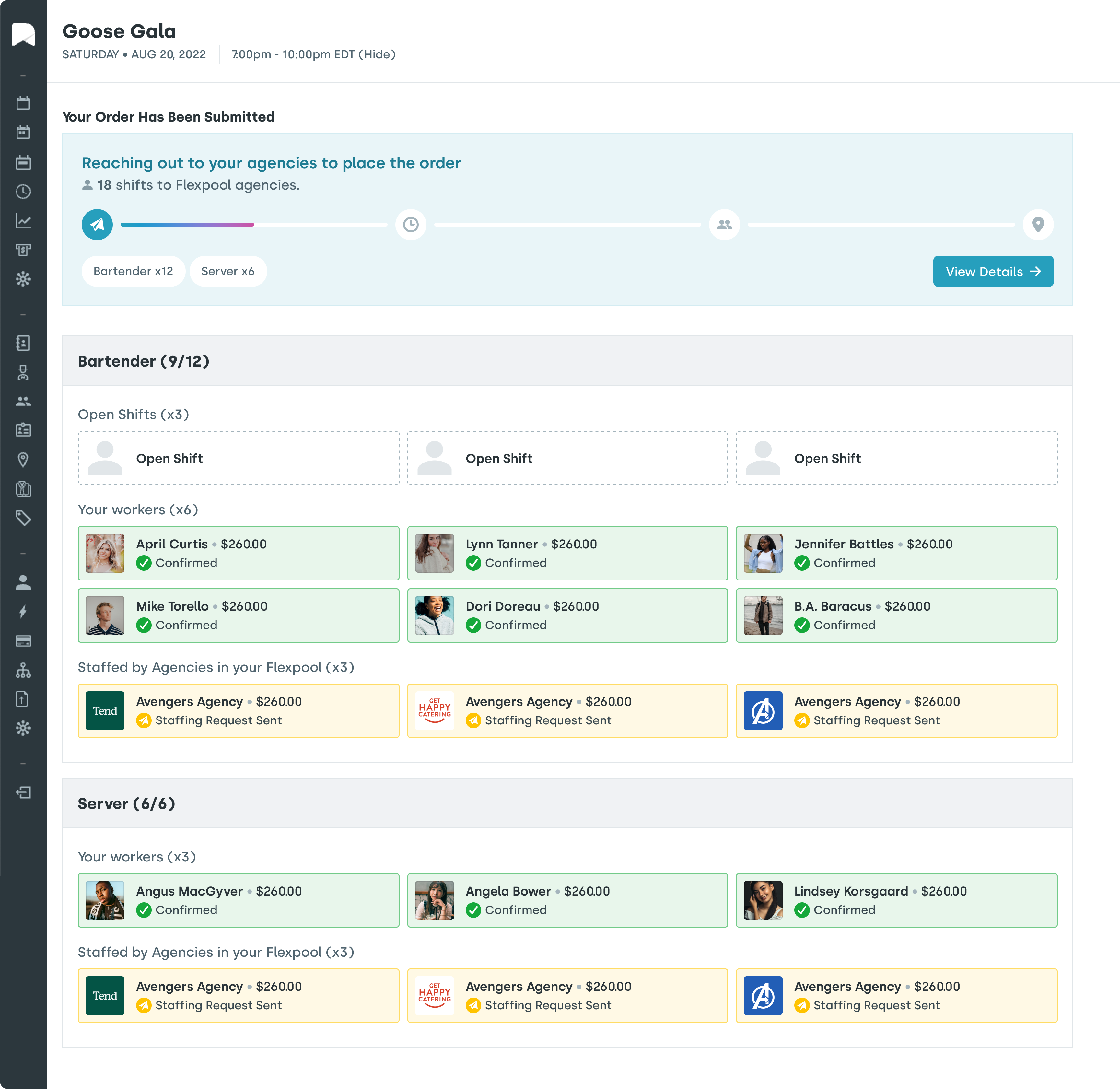
- Open shift management that lets employees claim shifts or swap shifts directly from mobile devices
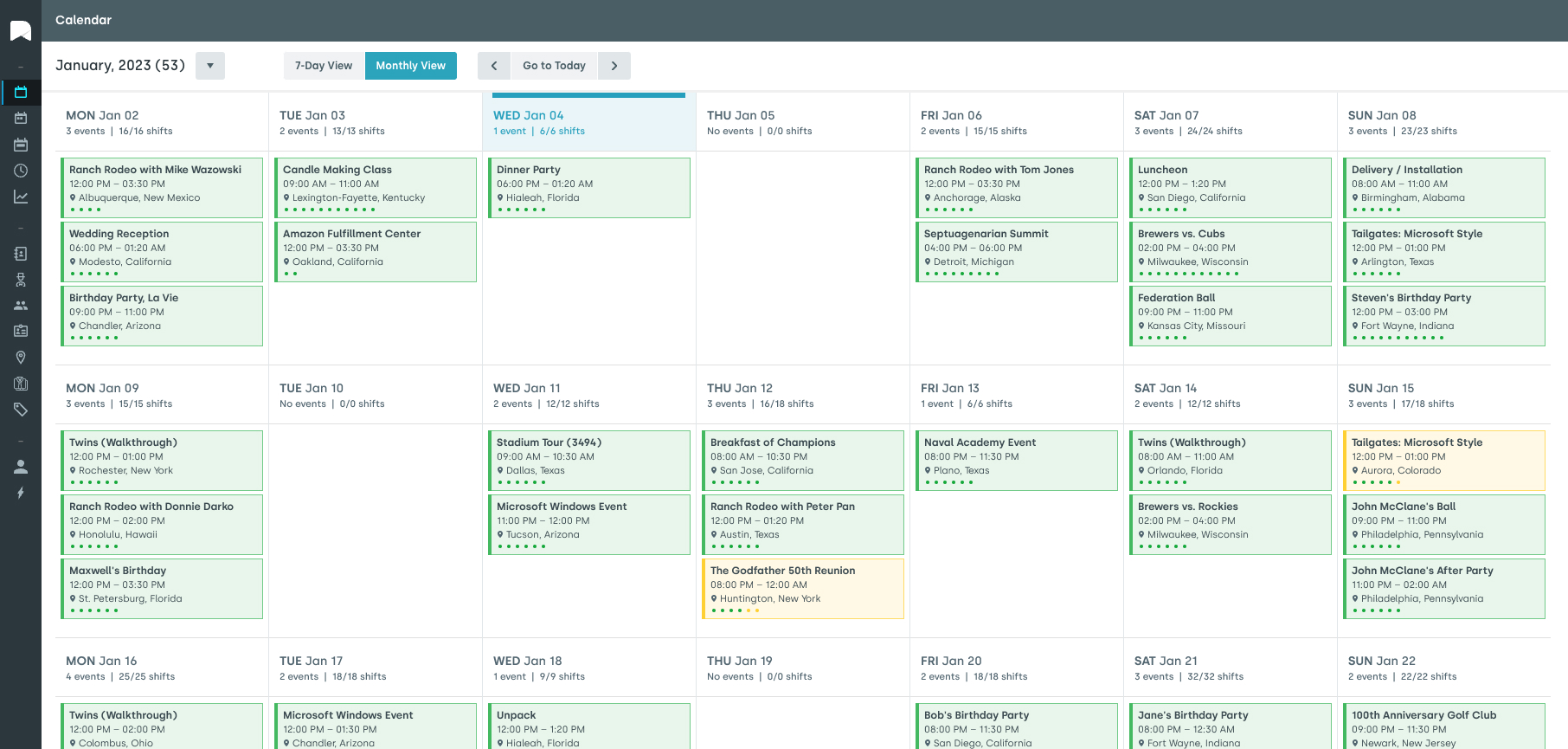
The result is a schedule built on real data, not gut instinct. Nowsta’s AI-powered scheduling engine cuts scheduling time by up to 80% by automating the heavy lifting while keeping managers in control of final decisions.
Pro tip: The best workforce management solution for scheduling isn’t the one with the most features. It’s the one your managers will actually use. Prioritize clean, intuitive interfaces over feature bloat.
Time and Attendance Tracking
Tracking employee time accurately is non-negotiable for operational efficiency and improved payroll accuracy. Modern workforce software goes well beyond a digital punch clock:
- GPS-verified clock-ins confirm workers are physically on-site, critical for mobile workforce management and field service teams
- Geofencing alerts flag employees who attempt to clock in from outside an approved location
- Automated overtime alerts notify managers when workers approach hour thresholds
- Missed punch notifications catch forgotten clock-outs before they create payroll errors
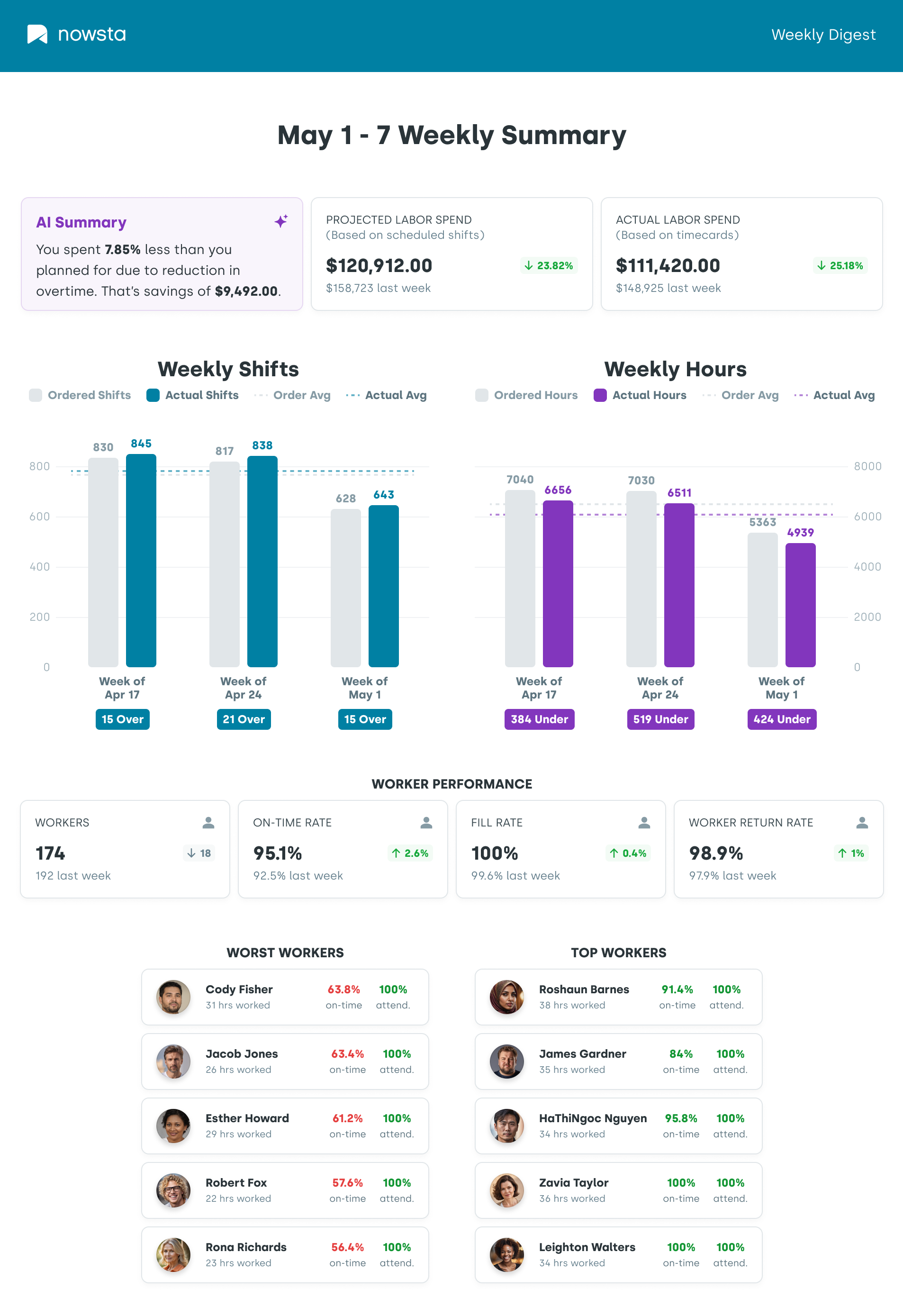
- Real-time visibility into who’s currently working, where, and against what budget
For organizations managing remote workers, delivery personnel, or mobile workers across multiple locations, GPS-based attendance tracking through mobile devices isn’t optional. It’s the only way to maintain data accuracy at scale.
Payroll Integration
This is where scheduling and time tracking pay off, literally. When workforce software integrates directly with your existing payroll systems:
- Approved hours transfer automatically with no manual re-entry
- Pay rules for overtime, shift differentials, and role-based rates apply automatically
- Payroll processing time drops significantly
- Errors that generate disputes, corrections, and compliance risks disappear
- HR teams spend less time fixing problems and more time on strategic work
Nowsta integrates seamlessly with existing payroll and accounting platforms, so the hours your team works flow directly into accurate pay without the administrative overhead.
What Compliance and Labor Law Features Look Like in Practice
Regulatory compliance is one of the most underappreciated functions of workforce software. Until something goes wrong, that is.
The Compliance Challenge
Labor laws aren’t static. They vary by state, industry, workforce type, and employee classification. For businesses managing hourly, non-exempt, or contingent workforces at scale, staying compliant manually means:
- Tracking dozens of overlapping federal, state, and local rules
- Managing union agreements and collective bargaining requirements separately
- Manually verifying that every schedule meets rest period and break requirements
- Hoping nobody misses an overtime threshold before payroll runs
One missed rule doesn’t just create a scheduling headache. It creates legal and financial exposure that compounds fast.
How Workforce Software Handles It
Purpose-built WFM software bakes compliance directly into the scheduling and time tracking process:
- Automated overtime management: Alerts fire when workers approach FLSA thresholds, before shifts are approved
- Break and rest period enforcement: Scheduling rules automatically build required rest periods between shifts
- Minor work restrictions: Age-based hour limits apply automatically for workers under 18
- Union and pay rule compliance: Negotiated agreements are coded into the scheduling engine, so violations are structurally impossible
- Audit trails: Every schedule change, clock-in, and timesheet approval is logged automatically for compliance documentation
- Global laws and multi-jurisdiction support: For businesses operating across multiple states, the system applies the correct rules by location automatically
The goal isn’t just avoiding fines. It’s making compliance a byproduct of normal operations, not a separate process someone has to monitor manually.
Pro tip:When evaluating WFM software for compliance, ask specifically how the platform handles multi-state labor laws and whether compliance rules update automatically when regulations change. Many platforms require manual updates, which defeats the purpose.
How It Improves Employee Experience and Reduces Turnover

Workforce software isn’t just a tool for operations teams. Employees feel its impact directly, and that has real consequences for retention.
The Connection Between Scheduling and Turnover
Inconsistent schedules, last-minute shift changes, and poor communication are among the top reasons hourly workers quit. WFM software offers self-service portals for employees to access pay, benefits, and schedules independently, improving employee satisfaction and effectively managing work-life balance.
When workers have easy access to their schedules in advance, can request time off without going through a manager, and can swap shifts directly through mobile apps, the experience of working for your organization improves measurably.
Specific Ways Workforce Software Improves Employee Engagement
- Advance schedule visibility: Workers see their shifts days or weeks ahead, enabling better work-life balance planning
- Mobile-first self-service: Employees manage schedules, submit time-off requests, and clock in and out from their own mobile devices without needing to contact a manager
- Fair shift distribution: Automated scheduling reduces the perception of favoritism by applying consistent rules to shift assignments
- Faster, accurate pay: When tracking employee time is precise, and payroll integration is seamless, workers get paid correctly and on time, every time
- Clear communication channels: Integrated team messaging keeps everyone informed about schedule changes, shift updates, and operational announcements without scattered group texts
The Retention Math
High turnover is expensive. Replacing an hourly worker typically costs between 50% and 200% of their annual salary when you account for recruiting, onboarding, and lost productivity. Workforce software that improves employee engagement and reduces scheduling frustration directly reduces that cost.
Nowsta customers see a 28% reduction in no-shows, which is a direct signal of improved employee commitment and scheduling quality. Fewer no-shows means fewer coverage gaps, less last-minute scrambling, and a better experience for the whole team.
What AI and Automation Add to the Picture
Workforce software has existed for decades. What’s changed dramatically is what artificial intelligence and automation now make possible inside these platforms.
From Rule-Based to Learning-Based
Traditional workforce software follows the rules you set. Modern AI-powered WFM software learns from patterns in your data and continuously improves its recommendations. The practical difference is significant:
| Traditional WFM | AI-Powered WFM |
|---|---|
| Fills shifts based on preset rules | Recommends optimal shift assignments based on historical performance |
| Flags overtime after it happens | Predicts overtime risk before schedules are published |
| Generates static reports | Delivers real-time analytics with actionable recommendations |
| Requires manual schedule adjustments | Auto-fills open shifts based on demand signals and worker patterns |
| Uses fixed labor planning cycles | Applies predictive analytics to forecast labor needs dynamically |
What AI Actually Does Inside Workforce Software
- Demand forecasting: Machine learning analyzes historical data, seasonal trends, and business patterns to predict exactly how many workers you’ll need and when
- Auto-scheduling: AI generates optimized shift schedules that balance labor expenses, employee availability, and compliance requirements simultaneously
- Predictive attendance: Identifies patterns that predict no-show risk before shifts begin, giving managers time to arrange coverage proactively
- Real-time analytics: Surfaces labor cost variance, schedule adherence, and workforce efficiency data at the moment decisions need to be made
- Automated reporting: Generates compliance reports, attendance summaries, and labor planning data without manual compilation
Companies using AI-powered workforce management report 40% faster scheduling and productivity gains of 20 to 30%, with AI-driven approaches reducing administrative workloads significantly.
Nowsta’s AI-powered platform applies these capabilities specifically to hourly and shift-based teams, where the stakes of scheduling errors are highest, and the volume of decisions is greatest.
Who Benefits Most, and When It Makes Sense to Invest

Workforce software delivers value across industries, but some organizations feel the impact more acutely than others.
Industries and Teams That Gain the Most
- Catering and Events: Variable demand, large contingent workforces, and multi-location operations make manual processes completely unworkable at scale. Workforce software handles contingent workforce management, real-time scheduling changes, and payroll accuracy across complex event staffing needs.
- Hotels and Hospitality: 24/7 operations with fluctuating occupancy demand, precise labor planning. WFM software ensures service level agreements are met without carrying excess labor costs during slow periods.
- Food and Beverage at Scale: Stadium concessions, large venue food service, and QSR operations depend on accurate, fast scheduling for large hourly workforces. Every labor dollar has to be accounted for.
- Field Service Teams and Mobile Workforce: Managing remote workers, delivery personnel, and field teams without mobile workforce management software means working blind. GPS-verified attendance and mobile-first scheduling are non-negotiable for these teams.
- Healthcare and Home Health: Compliance requirements, certification tracking, and 24/7 coverage needs make workforce software essential for managing schedules safely and legally.
When to Invest
The right time to invest in workforce software is before the problem becomes a crisis. Specifically, consider making the move when:
- Managers are spending more than 2 hours per week building or adjusting schedules
- Overtime is consistently running over budget without clear visibility into why
- Payroll errors are a recurring issue requiring manual corrections
- Compliance exposure is growing as your team and location count scale
- Employee turnover is high, and scheduling inconsistency is a contributing factor
- You’re managing multiple locations with no centralized visibility
How to Know If Your Current Setup Is Costing You More Than Software Would
Most organizations significantly underestimate what manual processes actually cost. Here’s a practical audit framework.
The Hidden Costs of Manual Workforce Management
| Cost Area | What to Measure | Red Flag Threshold |
|---|---|---|
| Scheduling time | Hours per week managers spend building schedules | More than 2 hours weekly |
| Overtime costs | OT as a % of total labor expenses | Consistently over 10% |
| Payroll errors | Number of corrections per pay period | More than 1-2 per cycle |
| No-show rate | % of shifts with unplanned absences | Over 5% per period |
| Compliance incidents | Violations, complaints, or near-misses per quarter | Any recurring pattern |
| Turnover rate | Annual employee turnover % | Above your industry benchmark |
| Time to fill open shifts | Average time to cover a vacancy | More than 2 hours |
Questions to Ask Your Team Right Now
If you answer yes to more than two of these, your current setup is likely costing you more than a dedicated workforce software solution would:
- Do managers regularly complain about how long scheduling takes?
- Has overtime exceeded budget in three or more of the last six months?
- Have you had payroll corrections that required contacting employees after the fact?
- Do you lack real-time visibility into who is actually working right now across all locations?
- Are you managing shift coverage through personal texts or group chats?
- Has a compliance issue or labor law question caught your team off guard in the past year?
The math on this is straightforward. If a platform like Nowsta cuts scheduling time by 80%, reduces no-shows by 28%, and eliminates the manual data entry between time tracking and payroll, the operational efficiency gains show up in your labor expenses and your team’s bandwidth within the first billing cycle.
Your Workforce Deserves Better Than Spreadsheets. So Does Nowsta.
Workforce software isn’t a luxury for growing operations. It’s the infrastructure that keeps labor costs controlled, compliance intact, and your team running without constant manual intervention. The businesses winning on efficiency aren’t working harder. They’re working with better systems.
Key takeaways:
- Workforce software handles scheduling, time and attendance, leave management, payroll integration, and compliance in one connected platform
- AI and automation replace manual processes with predictive, real-time decision-making
- Mobile technology gives field service teams, remote workers, and mobile workers full access from any device
- Compliance features protect against labor law violations before they happen, not after
- Employee self-service tools directly improve engagement, reduce no-shows, and lower turnover
- The hidden costs of manual workforce management almost always exceed the cost of purpose-built software
- The right time to invest is before the operational pain becomes a crisis
Workforce software works best when it’s purpose-built for your actual business needs, not adapted from a generic HR tool. Nowsta is built for hourly and shift-based teams. It integrates with your existing systems and helps you manage schedules, control labor costs, and boost productivity. No administrative chaos. No operational bottleneck.
Curious how workforce software changes daily operations? Nowsta handles shifts, time tracking, and payroll so your team doesn’t have to. Schedule a demo.
FAQs
What does workforce management software do for HR teams?
It takes the most time-consuming operational processes off HR’s plate entirely. Attendance management, schedule building, overtime tracking, and compliance documentation all run automatically.
That frees HR processes up for strategic work like workforce planning, talent development, and improving the overall employee experience. When WFM software integrates with other business systems, HR teams gain a single source of truth for all labor data.
Can workforce software integrate with our existing systems?
Yes, and it should. The best platforms are built to make WFM software integrate directly with your payroll, accounting, and HR tools without requiring a full system replacement. Most businesses don’t need to abandon existing systems.
They need a workforce layer that connects them. Always ask vendors specifically how their platform handles integration with your current business systems before committing.
Is workforce software worth it for smaller teams?
If you’re managing 50 or more hourly or shift-based workers, the ROI case is clear. Excessive overtime, payroll errors, and scheduling inefficiencies cost far more than the software itself.
For smaller dedicated teams, the value shows up quickly in scheduling time saved, improved payroll accuracy, and better resource allocation across shifts and locations.
How does workforce software support remote workforce management?
Modern platforms are built for exactly this. Mobile technology enables remote workers to clock in via GPS-verified mobile apps, view schedules, swap shifts, and submit time-off requests from any device.
For field service teams, delivery personnel, and any mobile workforce operating outside a traditional office, remote workforce management features aren’t optional. They’re the entire point.
How does workforce software help with total workforce management?
Total workforce management means managing every worker type, full-time, part-time, hourly, and contingent, through one platform. The best WFM tools handle contingent workforce management alongside permanent staff, so resource allocation decisions are based on complete labor data rather than partial visibility.
This unified view is what allows businesses to genuinely optimize employee productivity and meet business objectives without constant manual reconciliation across disconnected tools.
Does workforce software improve the customer experience?
Indirectly but meaningfully. When operational processes run smoothly, the right people show up to the right shifts on time, service levels stay consistent, and your team isn’t stretched thin from coverage gaps or excessive overtime. That operational reliability translates directly into a better customer experience.
Advanced analytics inside WFM platforms also help forecast labor needs against demand, so service quality stays high even during peak periods. Businesses that adopt new technology to manage their workforce more intelligently consistently report improvements in both team performance and customer satisfaction.