At some point, every growing operation hits the same wall. The spreadsheets stop working. The group texts become unmanageable. Payroll takes forever. Shifts get missed. And managers are spending more time administering the workforce than actually leading it. Sound familiar?
Companies that implement workforce management solutions often report a 20% improvement in productivity and up to 15% in labor cost savings. The difference between those companies and the ones still drowning in manual processes usually comes down to one thing: the right software. Here’s what we’re covering:
- What workforce management software actually is
- Core features to look for
- The difference between WFM and HR software
- How it handles compliance and payroll
- What AI brings to modern WFM platforms
- How to choose the right solution for your team
- What real ROI looks like
When your scheduling, time tracking, payroll, and compliance live in one place, everything gets easier. That’s exactly the kind of platform Nowsta was built to be, purpose-built for hourly and shift-based teams that can’t afford operational gaps.
What Workforce Management Software Actually Is
Workforce management software (WFM software) is a platform that centralizes everything you need to plan, schedule, track, and optimize your workforce. One system. No more jumping between disconnected tools for employee scheduling, time and attendance, payroll, and compliance management.
Think of it as the operating system for your workforce. Every decision about labor needs, from who works when to what it costs, runs through it.
Then vs. Now
Traditional workforce management solutions were built for a simpler era. Here’s how far things have come:
| Traditional WFM | Modern WFM Software |
|---|---|
| Paper schedules and whiteboards | AI-powered, auto-generated shift schedules |
| Manual punch clocks | GPS-verified mobile time tracking |
| Spreadsheet timesheets | Real-time attendance data synced to payroll |
| Reactive compliance checks | Automated compliance alerts before violations happen |
| Siloed reporting | Centralized workforce management data across all locations |
What It Actually Solves
Many organizations struggle with the same core problems before adopting WFM software:
- Scheduling chaos: Managers spending hours every week manually creating and adjusting schedules
- Labor cost overruns: Overtime sneaking up because there’s no real time visibility into hours
- Payroll errors: Manual data entry between time tracking and payroll systems creates costly mistakes
- Compliance exposure: Labor laws change, and manual processes can’t keep up
- Poor workforce visibility: No single source of truth for attendance, costs, or staffing levels
77% of organizations report increased workforce productivity after implementing WFM software. When workforce management data flows freely between scheduling, time tracking, and payroll, the entire operation becomes more accurate, more efficient, and far less dependent on manual processes that inevitably break down.
WFM software also scales with you. The same core functionality that helps a 50-person catering company manage weekend events supports a 500-person contingent workforce management operation across multiple locations and shift types.
Core Features to Look For

Not all WFM platforms are built the same. Some focus narrowly on time tracking. Others try to be everything to everyone and end up doing nothing particularly well. Here’s what a genuinely capable workforce management solution should include.
Employee Scheduling
The foundation of any WFM platform. Look for tools that let managers build and publish shift schedules quickly, allow employees to view schedules and claim shifts from mobile devices, and support flexible scheduling across different shift types. The best workforce management solution will also auto-fill open shifts based on employee availability and skills, not just who’s next on a list.
Time and Attendance Tracking
Tracking employee time accurately is non-negotiable. Modern platforms go beyond basic clock-in/clock-out. Look for:
- GPS-verified clock-in for mobile workforce management
- Geofencing to confirm workers are on-site
- Automated alerts for missed punches or early departures
- Attendance data that syncs directly to payroll without manual entry
Labor Forecasting
Forecasting labor needs based on historical data, seasonal trends, and business demand is what separates reactive scheduling from strategic workforce planning. Strong WFM systems use predictive analytics to help you staff accurately, reduce costs from overstaffing, and avoid the customer satisfaction damage that comes from being understaffed.
Compliance Management
Labor laws are complex, layered, and constantly changing. A capable WFM platform monitors compliance risks automatically, flagging violations around overtime, rest periods, minor work restrictions, and union agreements before they become legal or financial problems. This is one of the most underrated benefits of workforce management.
Payroll Integration
Tracking employee time means nothing if that data doesn’t flow cleanly into payroll. The best WFM systems integrate directly with your existing business systems, eliminating duplicate data entry, reducing errors, and cutting payroll processing time significantly.
Self-Service for Employees
Modern employees expect access to their own data. A self-service portal or mobile app where workers can view schedules, request time off, swap shifts, and access pay stubs improves employee satisfaction and reduces the volume of routine tasks that land on managers’ plates every day.
Real-Time Analytics and Reporting
You can’t manage what you can’t measure. Strong WFM software surfaces key performance indicators like labor cost vs. budget, schedule adherence, overtime trends, and attendance data in real time, so managers can course-correct before small problems become expensive ones.
The Difference Between WFM and HR Software
Many organizations struggle to understand where workforce management ends and HR begins. They’re related, but they solve fundamentally different problems.
| Workforce Management (WFM) | HR Software | |
|---|---|---|
| Primary focus | Day-to-day labor operations | Full employee lifecycle |
| Key functions | Scheduling, time tracking, attendance, compliance | Recruiting, onboarding, benefits, performance reviews |
| Time horizon | Daily, weekly, monthly | Long-term and strategic |
| Users | Operations managers, schedulers, and frontline workers | HR professionals, talent teams, executives |
| Core output | Optimized labor utilization and cost control | Employee development and organizational strategy |
HR software asks: “Do we have the right people?” WFM software asks: “Are the right people showing up at the right time, and what is it costing us?”
Most growing businesses need both. But for operations teams managing hourly or shift-based workers, WFM software is often the higher-priority investment because workforce productivity and labor costs are tied directly to day-to-day execution, not annual performance cycles.
Many organizations use HR software for the big-picture strategy while relying on purpose-built WFM systems for operational execution. The two can and should work together, with workforce management data feeding into broader HR analytics and workforce strategies.
How WFM Software Handles Compliance and Payroll

Compliance is where organizations often feel the most pain, and where the right software delivers some of its clearest value.
Regulatory Compliance, Automated
Labor laws vary significantly across states, industries, and workforce types. For organizations managing hourly workers, non-exempt employees, or contingent workforce management at scale, mitigating compliance risks is an ongoing challenge. WFM software addresses this in several ways:
- Automated overtime alerts that flag when employees approach FLSA thresholds before shifts are approved
- Rest period enforcement that ensures scheduling gaps comply with state-mandated break requirements
- Union agreement tracking that builds negotiated rules directly into the scheduling engine
- Audit trails that document attendance data, schedule changes, and time approvals in case of a labor dispute
The goal isn’t just to avoid fines. It’s to build a scheduling and time tracking process that ensures compliance happens as a byproduct of normal operations, not as a separate checklist someone has to remember.
Payroll Without the Manual Work
For most businesses, payroll is one of the most time-consuming and error-prone processes in the building. WFM software eliminates the gap between hours worked and hours paid by automating the data flow between time and attendance and payroll systems.
When your WFM software integrates with payroll:
- Approved hours transfer automatically, no manual data entry
- Overtime calculations follow the correct rules for each employee type
- Payroll processing time shrinks from hours to minutes
- Errors that generate disputes, corrections, and compliance risk drop significantly
Nowsta integrates directly with existing payroll and accounting systems, automating wage calculations and keeping payroll accurate across every shift type your business runs. For teams managing large volumes of hourly workers, that kind of seamless connection isn’t a nice-to-have. It’s what makes the whole operation sustainable.
What AI Brings to Modern WFM Platforms
The jump from traditional workforce management solutions to AI-powered platforms isn’t incremental. It’s a fundamental shift in what’s possible.
99% of WFM users say that workforce management software is critical to the success of their organization, with 81% saying it’s becoming more important over time. The reason that number keeps climbing is largely tied to what AI now makes possible.
Smarter Forecasting Labor Needs
AI analyzes historical data across seasons, events, and demand patterns to predict future staffing needs with far greater accuracy than human estimation. For businesses like catering companies and event operators, where demand swings dramatically week to week, this kind of precision is a genuine competitive edge.
Auto-Scheduling and Shift Optimization
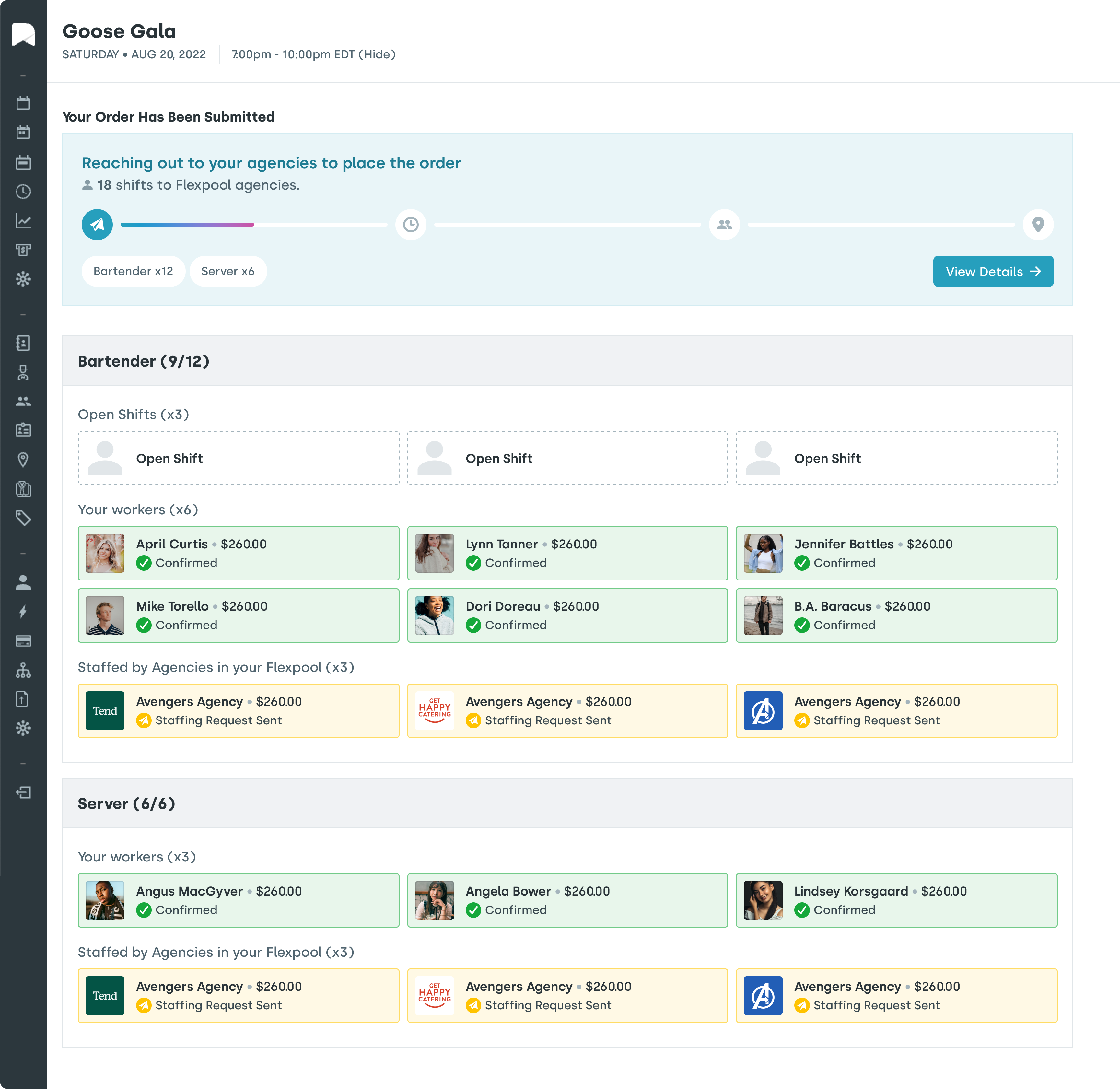
Instead of managers manually creating schedules from scratch, AI-powered WFM systems generate optimized shift schedules based on employee availability, skills, labor budget constraints, and compliance requirements. Managers review and adjust. The heavy lifting is done.
Nowsta’s AI-powered scheduling engine lets operations teams build optimal schedules in a fraction of the time it previously took, cutting scheduling time by up to 80% while factoring in demand signals and compliance guardrails automatically.
Predictive Attendance and No-Show Alerts
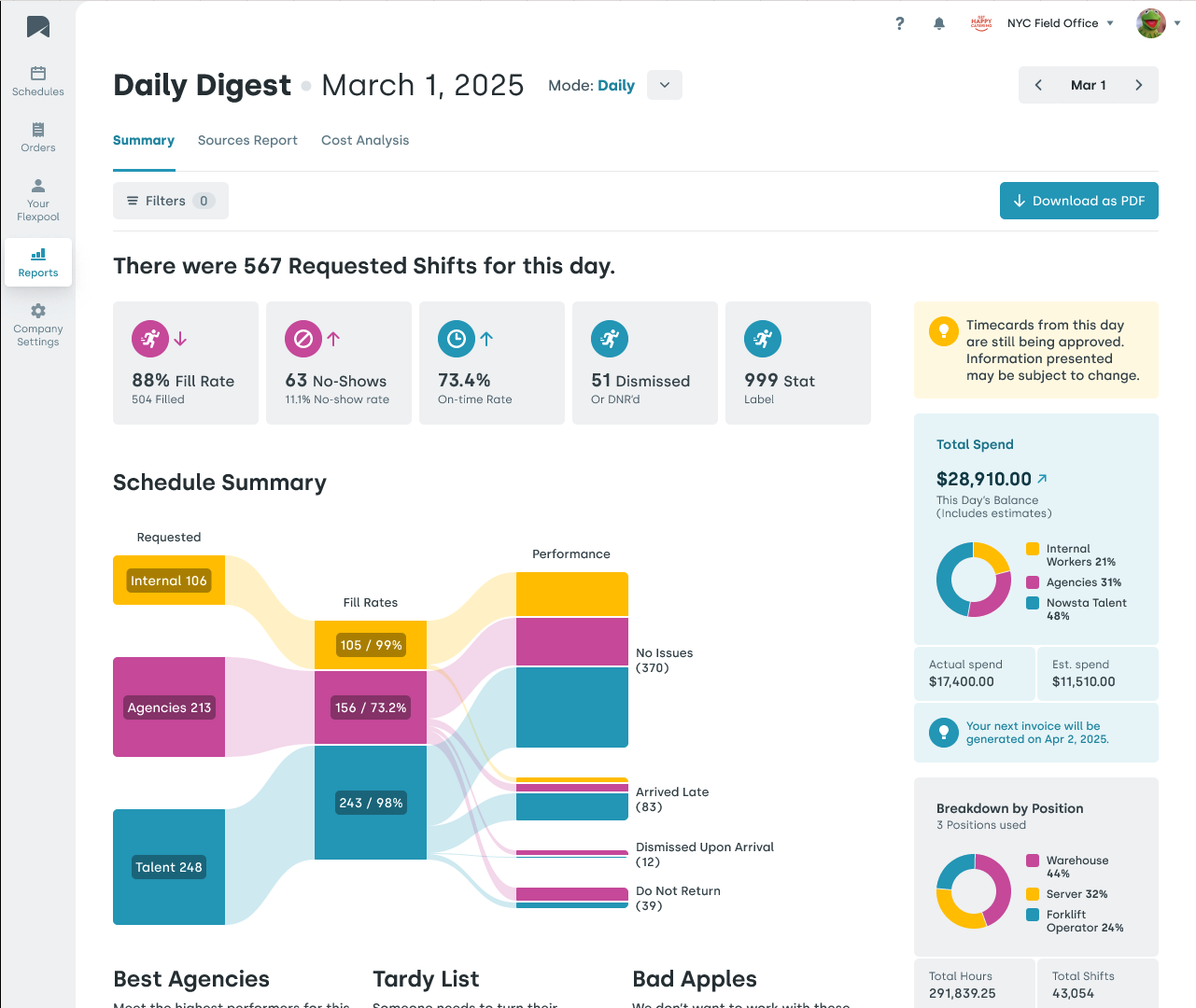
Machine learning models identify patterns in attendance data that predict which employees are at risk of no-showing before it happens. Managers get ahead of coverage gaps instead of scrambling to fill them at the last minute.
Real Time Analytics at the Decision Point
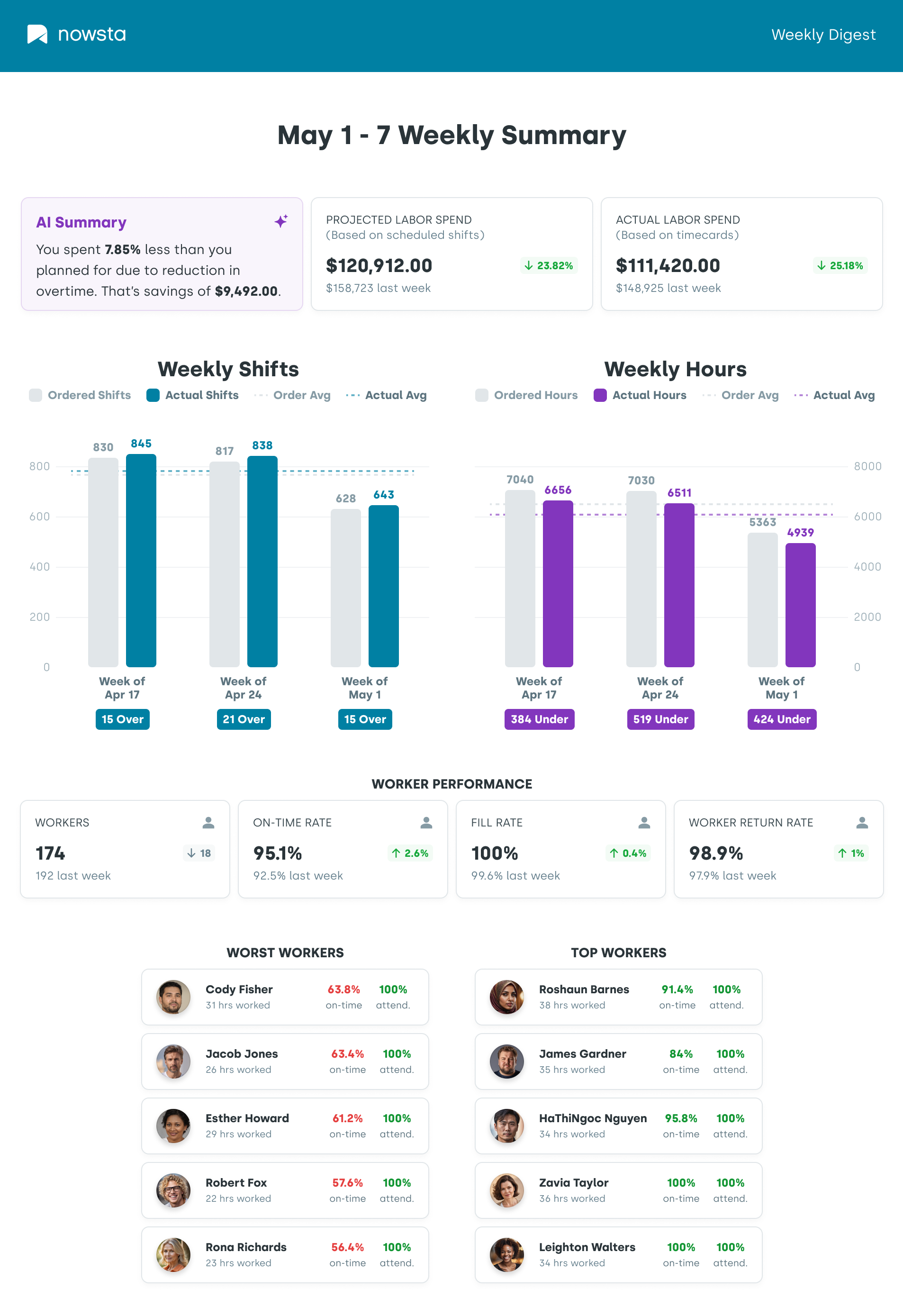
AI surfaces real-time analytics exactly when managers need them. Labor cost is trending against the budget mid-week. Overtime risk flagged before it’s approved. Employee performance data tied to shift patterns. The insight arrives while there’s still time to act, not in a report that arrives three days later.
Pro tip: When evaluating AI features in WFM software, look past the buzzwords. Ask specifically: does the AI learn from your data over time, or does it just follow preset rules? The difference between adaptive machine learning and glorified automation is significant.
How to Choose the Right Solution for Your Team

With dozens of WFM platforms on the market, narrowing down your options requires a clear framework. Here are the key considerations that actually matter.
Start With Your Biggest Pain Points
Before evaluating features, identify where your current process breaks down most often. Is it scheduling time eating up manager hours? Overtime running over budget? Compliance exposure from manual processes? Payroll errors from disconnected systems? The right platform solves your actual problems, not just the ones listed on a product marketing page.
Match the Platform to Your Workforce Type
Different workforce types have different requirements. A platform built for remote workforce management might not handle the shift-based complexity of an events or catering operation. Make sure the software is genuinely designed for:
- Hourly and shift-based workers
- Multiple locations and variable demand
- Contingent and part-time workforce management
- Mobile workforce management for deskless employees
Evaluate Integration Depth
Your WFM software doesn’t operate in a vacuum. It needs to work with your other business systems, particularly payroll, HR, and accounting. Ask vendors specifically how their platform integrates with the tools you already use, and whether data flows automatically or requires manual exports.
Look for Mobile-First Design
Your workforce lives on mobile devices. If your WFM platform isn’t genuinely mobile-first, with full functionality through mobile apps rather than a stripped-down version of a desktop interface, adoption will suffer. Workers who can manage schedules, view shifts, swap shifts, and clock in from their phone are more engaged and more compliant.
Assess Scalability Honestly
The best workforce management solution for today might not be the right one for where you’re headed. Evaluate whether the platform can scale with you in terms of headcount, locations, and workforce complexity without requiring a full system replacement.
Questions Worth Asking Every Vendor
- How does your platform handle compliance across multiple states?
- Can your system separately track and report FLSA overtime premiums?
- How does scheduling data connect to payroll processing?
- What does implementation actually look like, and how long until we see ROI?
- How does your mobile app handle employee self-service for shift swapping and time off requests?
What Real ROI Looks Like
The return on investment from WFM software shows up across your operation in ways that are both measurable and qualitative.
The Numbers That Move
One major WFM platform documented over $14 million in total savings over three years for a 10,000-employee organization, including $6.4 million from scheduling optimization alone and $3.6 million from reduced employee turnover driven by improved employee engagement and flexible scheduling.
For most businesses, the ROI case is built from several compounding benefits:
| ROI Driver | Typical Impact |
|---|---|
| Reduced scheduling time | Up to 80% less time creating schedules |
| Labor cost reduction | 15 to 20% through better forecasting and overtime control |
| Payroll error reduction | Near elimination of manual entry errors |
| Lower turnover | Improved work-life balance and schedule consistency |
| Compliance cost avoidance | Reduced penalties and legal exposure |
| No-show reduction | Up to 28% fewer missed shifts |
The Qualitative Wins That Are Harder to Quantify
Beyond the hard numbers, WFM software changes the experience of managing a workforce:
- Managers spend less time on routine tasks and more time leading their teams
- Employees feel more respected when schedules are consistent, fair, and communicated in advance
- HR professionals get cleaner workforce management data for reporting and planning
- Operations leaders gain the real-time visibility they need to make confident decisions
Organizations that effectively use WFM software report increased efficiency and reduced operating costs (65% of respondents), reduced planning effort (51% of respondents), and lower turnover and hiring costs (41% of respondents).
The payback period is faster than most people expect. The average payback period for workforce management solutions is just under five months.
For shift-based and hourly operations specifically, those benefits are even more concentrated. Every percentage point of improvement in schedule adherence, overtime control, and no-show rates flows directly to your bottom line in ways that compound over time.
Nowsta is built to deliver exactly that kind of measurable, operational ROI. From AI-powered scheduling that cuts build time by 80% to real-time compliance alerts and seamless payroll integrations, it’s a platform designed for teams that need their workforce management to actually work at scale.
Your Workforce Runs Better When Nowsta Runs It
The right workforce management software doesn’t just save time. It transforms how your entire operation functions, from the schedule that gets built on Monday to the paycheck that goes out on Friday. Every process in between gets faster, cleaner, and more controlled.
Key takeaways:
- WFM software centralizes scheduling, time and attendance, payroll, and compliance into one platform
- Core features to prioritize: AI scheduling, mobile time tracking, real-time data, self-service tools, and payroll integration
- WFM and HR software solve different problems. WFM owns day-to-day labor operations; HR owns the long-term people strategy
- Automated compliance management actively mitigates compliance risks before they become legal or financial liabilities
- AI and machine learning help forecast labor needs, boost productivity, and reduce no-shows before they happen
- The average payback period for workforce management solutions is under five months
- Real ROI shows up in labor cost reduction, improved workforce productivity, lower turnover, and cleaner payroll
The teams that get the most from their workforce management tools are the ones that stop treating scheduling and compliance as administrative burdens and start treating them as competitive levers.
Nowsta is purpose-built for exactly that, giving operations teams the real-time data, AI-powered automation, and seamless integrations needed to maximize productivity, minimize costs, and manage their workforce with genuine confidence.
Ready to manage scheduling, payroll, and compliance in one place? Nowsta brings it all together in a single platform. Schedule a demo.
FAQs
What are examples of HCM software?
HCM (Human Capital Management) software covers the full employee lifecycle. Common examples include Workday, SAP SuccessFactors, Oracle HCM, ADP Workforce Now, and Rippling. These management systems handle recruiting, onboarding, benefits, payroll, and performance.
They differ from dedicated WFM platforms, which focus more narrowly on scheduling, time tracking, and day-to-day labor operations to boost productivity and improve employee efficiency.
What is WFM used for?
Workforce management WFM software is used to plan, schedule, track, and optimize a workforce. The key components include employee scheduling, time and attendance, labor forecasting, compliance management, and payroll integration.
The core goal is total workforce management: getting the right people working the right shifts at the right cost while maintaining data accuracy and regulatory compliance.
What are the 4 pillars of workforce management?
The four pillars are forecasting, scheduling, time and attendance tracking, and performance management. Together, they form the processes involved in aligning labor supply with business demand. Strong management systems build all four into a single workflow so that resource allocation decisions are driven by real-time data rather than guesswork.
What are the 7 R’s of workforce planning?
The 7 R’s are a framework for effective resource allocation: the Right people, Role, Place, Time, Skills, Cost, and Engagement. Together, they ensure business goals are met by matching employee skills and capacity to actual labor needs. Modern workforce management tools apply this framework automatically through AI-powered forecasting and scheduling.
What is workforce management software used for?
It’s used to manage the full cycle of workforce operations. That includes creating schedules, tracking employee time, managing time off, ensuring regulatory compliance, forecasting future staffing needs, and integrating with payroll. The outcome is improved workforce productivity, better employee feedback loops through self-service tools, and lower labor costs across the board.
How much does WFM cost?
Pricing varies widely based on company size, features, and industry. Entry-level software solution options for small teams can start around $2 to $6 per user per month, while enterprise-level management systems with advanced AI, compliance tools, and multi-location support typically run $25 to $100 or more per user monthly.
The more relevant question is ROI. Given that WFM software helps minimize costs, reduce overtime, and maximize productivity, most organizations see full payback in under five months.